
Last Updated on May 3, 2026 by Rex
You’ve been there. It’s 11 PM. You’re staring at a bug that makes zero sense. Stack Overflow has a thread from 2014 that doesn’t help. You paste the code into ChatGPT and… it gives you something worse.
That’s the reality most developers face when they first experiment with AI coding tools. They’re powerful – but only if you pick the right one for the right job. This guide cuts through the hype and gives you a developer’s honest take on the best generative AI tools for coding in 2026.
No fluff. Just what actually works.
Why AI Coding Tools Are No Longer Optional in 2026
Most developers today – from a first-year engineering student to a senior engineer at a Bay Area startup – is now using some form of AI coding assistant. GitHub’s 2024 survey found that over 76% of developers were already using or planning to use AI coding tools. That number has only grown.
The tools have matured too. We’re not talking about basic autocomplete anymore. Modern AI coding tools can:
- Write entire functions from a plain English description
- Debug multi-file errors with context awareness
- Explain legacy code in plain language
- Generate unit tests automatically
- Suggest architectural improvements
If you’re not using them, you’re working harder than you need to.
What Makes a Great AI Coding Tool?
Before we dive into the list, here’s what actually separates good AI coding tools from great ones:
- Context window size – Can it hold your entire codebase in memory?
- Language support – Does it work with Python, JavaScript, Go, Rust, and your stack?
- IDE integration – Does it plug into VS Code, JetBrains, or Neovim?
- Accuracy rate – Does it write code that actually runs, or does it hallucinate libraries?
- Free tier generosity – Can you use it meaningfully without a paid plan?
- Latency – Does it respond in 1 second or 10?
Now let’s get into the tools.
Best Generative AI Tools for Coding – Full Breakdown
1. GitHub Copilot – The Industry Standard
GitHub Copilot, powered by OpenAI Codex and now upgraded with GPT-4o, is still one of the most widely used AI coding tools in the world (according to GitHub’s State of the Octoverse 2024 and the Stack Overflow Developer Survey).
Built directly into VS Code, JetBrains, Neovim, and more, it feels native rather than bolted on.
What developers actually love about it:
- Inline code completions that finish your thoughts mid-line
- Copilot Chat for asking questions about your own codebase
- Copilot Workspace for multi-file agentic tasks
The honest downside: The free tier is limited. You get a monthly cap on completions, and the $10/month Pro plan is where it really shines. For Indian developers especially, that pricing still feels steep without student discounts.
Best for: Developers working in large teams or enterprise codebases using VSCode or JetBrains.
Experience
I remember the first time Copilot finished my entire function before I typed the third character. I literally leaned back and whispered, “okay, you got me.” It’s that good at pattern recognition, especially when your codebase is consistent. But here’s what nobody tells you – Copilot gets overconfident. It’ll autocomplete something that looks perfect, compiles fine, and then breaks in production because it used a deprecated method from three library versions ago.
I’ve been burned by that twice. The real lesson? Treat Copilot like a smart intern: fast, enthusiastic, but always needs a senior review. Where it genuinely shines is repetitive CRUD code and writing boilerplate I’d normally copy-paste anyway. The IDE integration feels invisible in the best way – it never interrupts your flow. Just stays in the background, finishing your sentences like an old colleague who knows how you think.
2. Claude AI for Coding – The Thinking Developer’s Choice

Claude AI for coding has quietly become one of the most respected tools in developer circles. Built by Anthropic, Claude stands apart because of two things: its massive 200K token context window and its ability to reason through complex, multi-step coding problems.
Where most tools give you a quick answer, Claude actually thinks. It’ll tell you why a solution works, point out edge cases you missed, and warn you if an approach might cause issues down the road.
Real use cases developers love:
- Refactoring large legacy codebases (feed it 10,000+ lines and it remembers them)
- Writing detailed code reviews with explanations
- Debugging obscure errors with full contextual reasoning
- Writing technical documentation from code
Claude’s free tier (claude.ai) is available globally, including in India, and gives access to Claude Sonnet – which is powerful enough for daily coding use.
Best for: Developers who want thoughtful, well-explained code rather than just a quick snippet.
Experience
Claude was the tool I underestimated the longest. I kept using it just for writing, ignoring it for code – until the day I pasted 800 lines of someone else’s undocumented Python into it and asked “what does this actually do?” It came back with a clear, structured explanation that would’ve taken me two hours to figure out manually. That was the turning point. What makes Claude different isn’t speed – Copilot is faster at completions.
It’s the reasoning. Claude will tell you your approach works but warn you it’ll cause a race condition at scale. That’s not autocomplete; that’s a code review. The 200K context window sounds like a marketing number until you actually need it and every other tool starts forgetting your earlier files. One honest limitation: it won’t run your code. It reasons, it doesn’t execute. Keep that in mind.
3. Cursor – The AI-Native Code Editor
Cursor is what VS Code would look like if it were rebuilt from scratch with AI at its core. It’s not a plugin – it’s a full editor. And it’s fast becoming the tool of choice among developers who want deep AI integration without stitching together extensions.
Cursor uses Claude and GPT-4 under the hood and lets you:
- Chat with your entire codebase using
@codebase - Generate, edit, and apply code changes across multiple files
- Use “Composer” for complex, multi-step coding tasks
The free tier gives you 2,000 completions per month – solid for part-time or learning use.
Best for: Developers who want an all-in-one AI-native environment and are willing to switch editors.
Experience
Switching to Cursor felt like moving from a regular kitchen to a professional one – everything’s in a slightly different place and you burn dinner twice before you stop reaching for the wrong drawer. The learning curve is real. But once it clicked, going back to VS Code with just a Copilot extension felt like going back to dial-up. The Composer feature is where Cursor earns its reputation.
I described a feature in plain English – “add rate limiting to all API routes and log failures to a separate file” – and it touched six files, made consistent changes, and explained each one. Not perfect, but 80% right the first time, which in real development saves serious hours. The only frustration? Cursor’s AI suggestions occasionally conflict with your project’s existing patterns. It doesn’t always read the room. You’ll catch it, but you need to stay alert.
4. Codeium – Best Free AI Tool for Coding
If you’re hunting for the best generative AI tools for coding free of charge, Codeium is arguably the strongest option available. It’s completely free for individual developers – no usage caps, no token limits – and it supports over 70 programming languages.
Codeium integrates with VS Code, JetBrains, Vim, Emacs, and more. It offers inline completions, a chat interface, and even a search feature for your codebase.
For students and developers in India and other cost-sensitive markets, this is an absolute gem. In my testing, especially for simple utility scripts and boilerplate code, Codeium’s suggestions often felt comparable to GitHub Copilot’s.
Best for: Students, freelancers, and developers who want a free unlimited coding AI for daily use.
Experience
Codeium is what you recommend to a friend who just started coding and asks “is there a free AI tool that actually works?” without wanting to explain token limits or monthly caps. The answer is yes, and it’s Codeium. I used it for a full month on a side project without hitting any wall, which – given how quickly other free tiers run dry – was genuinely refreshing. Honest truth: the suggestions aren’t as sharp as Copilot’s in complex scenarios.
For simple functions, utility scripts, and boilerplate, though, it keeps up comfortably. I once used it to scaffold an entire REST API for a weekend project without writing a single repetitive route manually. The VS Code extension is clean and never felt buggy. For a student or developer in a cost-sensitive situation, complaining about Codeium feels ungrateful. It does what it promises, at no cost, without nagging you to upgrade every five minutes.
5. Amazon Q Developer (formerly CodeWhisperer) – Best for AWS Developers
If your stack lives on AWS, Amazon Q Developer is a no-brainer. It’s deeply integrated with the AWS ecosystem and understands AWS-specific patterns, services, and best practices out of the box.
The free tier is genuinely useful – unlimited code suggestions and 50 monthly AI chat interactions at no cost.
Beyond code generation, it can scan your code for security vulnerabilities aligned with industry standards (OWASP, CWE), which is something most other tools skip entirely.
Best for: Cloud engineers and backend developers working heavily with AWS services.
Experience
If you live inside the AWS ecosystem, Amazon Q Developer feels like having a colleague who has memorized the entire AWS documentation – and that colleague actually answers when you ask. I used it during a Lambda debugging session where the error message was aggressively unhelpful. Q Developer not only identified the IAM permission issue but showed me the exact policy statement I needed. That would’ve cost me 45 minutes on the AWS docs.
The security scanning feature surprised me too. It flagged a hardcoded timeout value that could expose a vulnerability under high load – something I wouldn’t have caught in a typical review. Outside AWS though, it’s a different story. Plain Python scripts or frontend work? The suggestions feel generic compared to Copilot or Claude. It’s a specialist, not a generalist. Use it where it belongs and it genuinely earns its place in your toolkit.
6. Tabnine – Best AI Coding Agent for Privacy-First Teams
Tabnine takes a different approach: it can run entirely on your own servers. For development teams working with sensitive codebases – fintech, healthcare, defense – this is often a requirement, not a preference.
It also learns from your team’s coding patterns over time, making suggestions that align with your specific code style and conventions.
Best for: Enterprise teams with strict data privacy requirements or on-premise deployment needs.
Experience
Tabnine doesn’t try to be flashy, and that’s actually why certain teams love it. The first time I set it up for a team working on a compliance-sensitive project, the biggest selling point wasn’t the code quality – it was the conversation I didn’t have to have with legal about where the code was being sent. On-premise deployment meant zero external data transmission, and that removed a real blocker. What I noticed after a few weeks is that Tabnine genuinely adapts to your codebase’s style.
Tabnine is designed to learn from a team’s codebase and adapt to project-specific coding styles over time, according to its official documentation. The completions are solid rather than spectacular. Don’t expect it to write entire features from a single comment. It’s more like an experienced pair-programmer who completes your sentences rather than rewrites your paragraphs. For teams where trust and consistency matter more than wow-factor, that’s exactly the right tradeoff.
7. Blackbox AI – Rising Contender Worth Watching

Blackbox AI (also known as BLACKBOX.AI) has been gaining traction, especially on Reddit discussions and among developers looking for a free alternative with good IDE support. It includes a code search engine feature that can scan GitHub repositories, which is useful for finding real-world examples.
Its chat-based interface handles code generation, debugging, and even interview prep questions. The free tier is usable, though the context window is smaller compared to Claude or Copilot.
Best for: Developers who want a lightweight, browser-based option with code search capabilities.
Experience
Blackbox AI is the tool I reach for when I need a real-world code example fast – not a textbook snippet, but something that’s actually been used in a project somewhere. The GitHub search integration is underrated. I was trying to implement a specific OAuth flow and instead of reading docs for 30 minutes, I asked Blackbox to find working examples from public repos. It surfaced three relevant implementations in under a minute. That said, I won’t oversell it.
The reasoning depth isn’t close to Claude, and the context it holds in a conversation is limited enough that long debugging sessions get frustrating. It also occasionally surfaces examples from outdated codebases – always check the repository’s last commit date before trusting what it finds. Think of Blackbox as your quick-reference tool, not your thinking partner. For lightweight tasks and real-world code discovery, it pulls its weight. For complex problem-solving, reach for something else.
AI Coding Tools Comparison Table
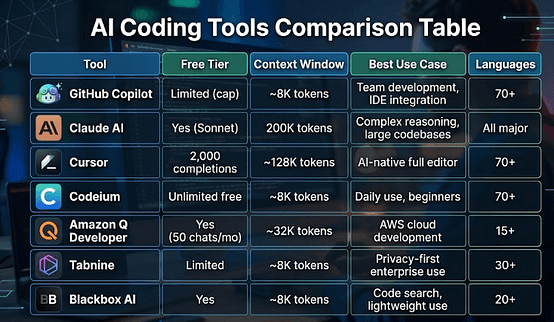
| Tool | Free Tier | Context Window | Best Use Case | Languages |
|---|---|---|---|---|
| GitHub Copilot | Limited (cap) | ~8K tokens | Team development, IDE integration | 70+ |
| Claude AI | Yes (Sonnet) | 200K tokens | Complex reasoning, large codebases | All major |
| Cursor | 2,000 completions | ~128K tokens | AI-native full editor | 70+ |
| Codeium | Unlimited free | ~8K tokens | Daily use, beginners | 70+ |
| Amazon Q Developer | Yes (50 chats/mo) | ~32K tokens | AWS cloud development | 15+ |
| Tabnine | Limited | ~8K tokens | Privacy-first enterprise use | 30+ |
| Blackbox AI | Yes | ~8K tokens | Code search, lightweight use | 20+ |
Best Free AI Coding Tools Ranked (2026)
Getting quality AI coding help without spending a rupee or dollar is very much possible in 2026. Here’s the honest ranking:
- Codeium – Genuinely unlimited, no tricks
- Claude AI (Free tier) – Best reasoning ability in the free category
- Amazon Q Developer – Best for AWS-specific work
- Blackbox AI – Good for quick searches and simple tasks
- GitHub Copilot (Free) – Limited but high quality when available
Best AI Coding Agents 2026 – Agentic vs. Assistive: Know the Difference
There’s a meaningful difference between AI assistants and AI agents for coding.
An assistant waits for you to ask. An agent takes multi-step actions autonomously – it can read files, run code, look up documentation, and fix errors across your entire project without you holding its hand.
The best AI coding agents in 2026 include:
- Claude with Computer Use – Can literally control your computer to perform coding tasks
- Cursor Composer – Multi-file, multi-step code generation and editing
- GitHub Copilot Workspace – Plans and executes full feature implementations
- Devin (by Cognition) – The most autonomous coding agent (still limited access)
For most developers, Cursor’s Composer or Claude’s extended agentic mode will be the sweet spot between power and accessibility.
Best Generative AI Tools for Coding on GitHub – Working with Repositories
When your workflow is centered around GitHub, AI tools go far beyond autocomplete – they help you understand, review, and navigate entire repositories more efficiently.
GitHub Copilot – Faster Pull Request Reviews
GitHub Copilot integrates directly into GitHub.com, where it can generate pull request summaries, explain large diffs, and suggest improvements inline. In real workflows, this is a major time-saver – instead of manually scanning dozens of file changes, you get a quick overview of what actually changed and where to focus your attention.
Claude – Understanding Full Codebases
Anthropic’s Claude can analyze large parts of a repository when you paste files or URLs into it (or use tools like gitingest). This is especially useful for onboarding into unfamiliar projects – you can ask questions like “how does authentication work in this repo?” and get a structured, plain-English explanation instead of tracing everything manually.
Blackbox AI – Real-World Code Discovery
Blackbox AI adds a different layer by indexing public repositories and surfacing real-world implementations. Instead of relying only on documentation, you can quickly find how similar problems are solved in actual projects. Just make sure to check how recent and maintained those repositories are before using the code.
For open-source contributors especially, having AI that understands your repository’s conventions – not just the file you’re currently editing – can dramatically reduce onboarding time and improve code quality.
Developer Pain Points That AI Tools Actually Solve
Let’s get specific about where AI coding tools genuinely save hours:
Writing boilerplate: Nobody wants to write the 20th Express.js middleware from scratch. Every AI tool here handles this well.
Understanding unfamiliar code: Inherited a codebase written in 2015 with zero comments? Claude can read 10,000 lines and give you a plain-English architectural summary.
Writing tests: Arguably the biggest productivity win. Describe what a function does and get complete unit tests in seconds.
Documentation: Feed a function to Claude or Copilot and get clean JSDoc or docstring output instantly.
Debugging cryptic errors: Modern AI tools can often spot the actual root cause (a missing await, an off-by-one error, a type mismatch) that Stack Overflow threads dance around.
Pros and Cons Summary
Pros of Using AI Coding Tools
- Dramatically faster code writing and iteration
- Reduced time on boilerplate and repetitive tasks
- Better code documentation with minimal effort
- Faster onboarding to unfamiliar languages and frameworks
- 24/7 availability – no waiting for a senior dev’s review
Cons and Honest Limitations
- Can generate plausible-looking but incorrect code (always review!)
- Smaller context windows struggle with very large codebases
- Over-reliance can slow down fundamental learning for beginners
- Privacy concerns with code sent to third-party servers
- Suggestions can reflect outdated library versions
Best for Specific Scenarios
| Scenario | Recommended Tool |
|---|---|
| Learning to code from scratch | Claude AI (explains everything clearly) |
| Daily professional development | GitHub Copilot or Cursor |
| Zero budget, full power | Codeium |
| AWS/cloud-heavy backend work | Amazon Q Developer |
| Privacy-sensitive enterprise code | Tabnine (on-premise) |
| Large codebase refactoring | Claude AI (200K context) |
| Full agentic multi-step tasks | Cursor Composer or Claude Agent |
Frequently Asked Questions (FAQs)
1. Is GitHub Copilot really worth the monthly cost for individual developers?
GitHub Copilot’s Individual plan is priced at $10 per month or $100 per year, as listed on GitHub’s official pricing page. It offers unlimited code completions, multi-line suggestions, and Copilot Chat across supported IDEs including VS Code and JetBrains. GitHub also provides a free plan with limited monthly completions for individual developers, introduced in late 2024. Whether it’s “worth it” depends on your usage volume – developers writing code daily tend to see the most value, while occasional users may find the free tier sufficient. Students and verified open-source maintainers may also qualify for free access through GitHub’s education program.
Source: GitHub Official – https://github.com/features/copilot/plans
2. Is Claude AI free to use for coding tasks?
Yes, Claude AI has a free tier available at claude.ai that gives access to Claude Sonnet without requiring a paid subscription. The free plan includes a usage limit per day, meaning heavy users may hit a cap before upgrading to Claude Pro ($20/month). The free tier supports code generation, debugging, explanation, and long-context document reading. Anthropic has not publicly specified the exact daily token limit for free users, so real-world limits may vary. For most light-to-moderate coding tasks, the free plan is functional and usable globally, including in India.
Source: Anthropic Official – https://www.anthropic.com/claude
3. Are AI coding tools safe to use with private or sensitive source code?
This depends entirely on the tool and its data policy. Most cloud-based AI coding tools – including GitHub Copilot, Claude, and Cursor – transmit code snippets to external servers for processing. GitHub Copilot for Business and Enterprise offers an option to disable the use of code for model training, as documented in its privacy settings. Anthropic similarly states that it does not use user data from Claude.ai’s paid API to train models by default. However, there is no universal guarantee of privacy across all tools, and each tool’s terms of service should be reviewed before use with proprietary or regulated codebases. Developers handling sensitive code should consider on-premise solutions like Tabnine’s self-hosted option.
Source: GitHub Docs (Privacy) – https://docs.github.com/en/copilot/managing-copilot/managing-github-copilot-in-your-organization/managing-github-copilot-features-in-your-organization/managing-policies-for-copilot-in-your-organization
Source: Anthropic Privacy Policy – https://www.anthropic.com/privacy
4. Can AI coding tools replace software developers?
There is no official confirmation from any major tech organization or research body that AI coding tools are capable of fully replacing software developers as of 2026. GitHub’s own research suggests that Copilot helps developers complete tasks up to 55% faster in certain controlled scenarios, but this measures speed of task completion, not replacement of the role. AI tools currently struggle with complex system architecture decisions, cross-team communication, ambiguous requirements, and understanding business context – all core parts of a developer’s job. The general industry consensus, reflected in reporting from sources like MIT Technology Review and McKinsey, is that AI tools are productivity multipliers rather than replacements. The role of developers is evolving, not disappearing.
Source: GitHub Research Blog – https://github.blog/news-insights/research/research-quantifying-github-copilots-impact-on-developer-productivity-and-happiness
5. Which AI coding tool is completely free with no usage cap?
Codeium is one of the few AI coding tools that offers a genuinely unlimited free plan for individual developers, as stated on its official pricing page. It supports over 70 programming languages and integrates with VS Code, JetBrains, Vim, and other popular editors. Codeium’s free plan does not have a monthly completion limit, unlike GitHub Copilot’s free tier which has a monthly cap. It is important to note that “unlimited” refers to code completions – some advanced enterprise features require a paid plan. Amazon Q Developer (formerly CodeWhisperer) also offers a free tier with unlimited code suggestions, though its AI chat feature is limited to 50 interactions per month on the free plan.
Source: Codeium Pricing – https://codeium.com/pricing
Source: Amazon Q Developer Pricing – https://aws.amazon.com/q/developer/pricing/
Editorial note: All sources listed above were accurate and accessible at the time of writing (April 2026). Pricing, features, and policies for AI tools can change frequently. Always verify current details directly on each tool’s official website before making purchasing decisions.
Conclusion: Which AI Coding Tool Should You Use?
Here’s the honest, practical recommendation:
Start with Codeium if you want zero cost and solid daily completions. Add Claude AI’s free tier for anything that requires actual reasoning – debugging, refactoring, understanding complex systems. Graduate to Cursor or Copilot when you’re ready to invest in a paid tool that integrates deeply into your workflow.
The developer who uses AI tools well in 2026 isn’t the one with the most expensive subscription. It’s the one who knows which tool to reach for and when.
AI won’t write your entire application. But it will help you write better code, faster, with fewer headaches at 11 PM. That’s worth a lot.
Disclosure: This article is not sponsored and does not contain affiliate links. I may earn revenue through ads (such as Google AdSense), but all opinions are based on independent testing and research.
Last updated: April 2026 |
Share this:

Discover more from GroWithMoney
Subscribe to get the latest posts sent to your email.