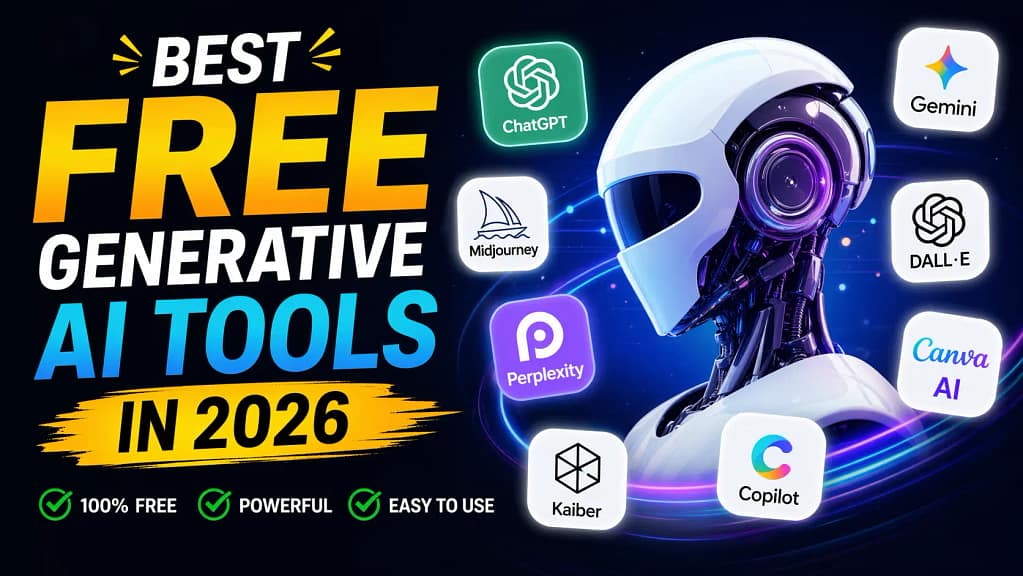
Looking for the best free generative AI tools free of charge in 2026? You’re in the right place.
This article covers the top free AI tools online – tested, ranked, and explained in plain English. No fluff, no filler. Just tools that actually work.
Whether you’re a student in India, a freelancer in the US, or just someone curious about what AI can do for free – this free AI tools list has you covered.
What Are Free Generative AI Tools?
Free generative AI tools are software applications that use artificial intelligence to create new content – text, images, code, or voice – at zero cost to the user.
Most of them offer a free plan with daily or monthly usage limits. Some don’t even need a login. And a few? They’re genuinely powerful enough to replace paid tools for casual use.
In 2026, the generative AI market is projected to exceed $66 billion, according to Grand View Research.
(Source: Grand View Research – Generative AI Market Size Report) – and the best part? A huge chunk of that value is now accessible to regular users for free.
Free AI Tools List (2026) – No Subscription Needed
Before we get into the detailed breakdown, here’s a quick overview of what “free” actually means in 2026.
“Free” can mean:
- A permanently free tier (limited features but always free)
- No login required for basic use
- Daily credit system (use X tokens per day at no cost)
- Free trial with no credit card required
Some tools stretch the definition. We’ve kept this list honest. If a tool calls itself free but locks every useful feature behind a paywall, it didn’t make the cut.
🔗 Want to see a full breakdown of both free AND paid options? Check out the complete Top 10 Generative AI Tools in 2026 comparison – including pricing in ₹ for Indian users.
My Experience Testing Free AI Tools in 2026
I didn’t just try these tools casually — I used them for actual work over 18 days, including writing drafts, summarizing PDFs, and researching topics.
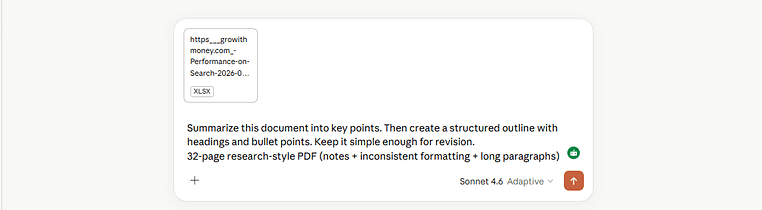
Here’s one real test that stood out
Test: Summarizing a 32-Page PDF Using Claude
Prompt I used: Summarize this document into key points. Then create a structured outline with headings and bullet points. Keep it simple enough for revision.
Input: 32-page research-style PDF (notes + inconsistent formatting + long paragraphs)
Output (Excerpt):
Main Topic: Impact of AI on entry-level jobs
Key Points:
- Automation is replacing repetitive cognitive tasks
- Demand is shifting toward AI-assisted roles
- Human oversight remains critical in decision-making
Structured Breakdown:
- Introduction to AI disruption
- Sectors most affected
- Skills that remain future-proof
- Limitations of current AI systems
Why This Was Impressive
- It didn’t just summarize — it restructured messy content into a clean study format
- No hallucinated sections (which often happens in other tools)
- It handled long context without losing coherence
Where It Still Falls Short
- Occasionally oversimplifies technical sections
- Requires a clear prompt — vague prompts = weaker output
My Takeaway
Free AI tools are only as good as your prompts.
Most people think the tools are limited — but after testing ChatGPT, Google Gemini, Claude, and Perplexity AI side-by-side, the real difference came down to how clearly I asked the question.
10 Best Free AI Tools in 2026 (Tested & Reviewed)

These aren’t just popular tools. They’re tools that actually work on the free plan – tested across writing, research, coding, and everyday tasks.
1. ChatGPT (Free Plan) – Best All-Rounder
What it does: ChatGPT writes, codes, summarizes, brainstorms, translates, and answers complex questions. One tool. Dozens of use cases.
Why it’s powerful: OpenAI’s GPT-4o is now available on the free plan (with usage limits). This is the same model that powers many premium AI apps – at no cost.
Best use case: Writing blog drafts, debugging code, generating marketing ideas, summarizing long documents.
Who should use it: Students, freelancers, content creators, small business owners – basically anyone.
Free plan available | No credit card required for signup
2. Google Gemini – Best for Google Users
What it does: Gemini is Google’s AI, baked directly into Gmail, Google Docs, and Google Search. It can draft emails, rewrite content, summarize notes, and answer questions with real-time data access.
Why it’s powerful: Unlike most AI tools, Gemini has access to live web data – which means its answers are more current. It’s also deeply integrated into tools billions of people already use daily.
Best use case: Rewriting Google Docs content, drafting Gmail replies, quick research with live sources.
Who should use it: Office workers, students using Google Workspace, anyone in the Google ecosystem.
100% free tools tier available | Works inside Gmail, Docs, Search
3. Microsoft Copilot – Best for Windows & Office Users
What it does: Microsoft Copilot is powered by advanced language models from OpenAI and is available for free on the web (with some usage limitations). It handles text generation, image creation (via DALL-E), and even code writing.
Why it’s powerful: Copilot in the browser (copilot.microsoft.com) requires no login for basic use. It’s one of the most capable free AI tools online right now.
Best use case: Generating images, drafting Word-style documents, answering complex questions with citations.
Who should use it: Casual users who want powerful AI without creating an account.
No login required for basic use | Image generation included for free
4. Perplexity AI – Best for Research
What it does: Perplexity is an AI-powered search engine that gives direct answers with sources. Think of it as Google, but smarter – and without the SEO spam.
Why it’s powerful: Every answer comes with citations you can verify. It’s faster than traditional search for getting direct answers and perfect for academic or professional research.
Best use case: Researching topics fast, fact-checking, finding credible sources.
Who should use it: Students, writers, researchers, bloggers, journalists.
Free plan is generous | No subscription needed for most queries
5. Claude (Free Plan) – Best for Long Writing
What it does: Claude by Anthropic is exceptional at handling long-form content – think 50-page PDFs, book summaries, detailed writing tasks, and nuanced reasoning.
Why it’s powerful: Claude has one of the largest context windows of any free AI tool, meaning it can read and process huge amounts of text at once without losing track.
Best use case: Summarizing long PDFs, writing essays, structured content drafting.
Who should use it: Students, academic researchers, writers, anyone working with lengthy documents.
Free tier available | Excellent for students in 2026
6. Leonardo AI – Best Free Image Generator
What it does: Leonardo AI generates high-quality images from text prompts. It gives free users a daily credit allowance – no credit card needed.
Why it’s powerful: The free plan is genuinely usable. Daily credits regenerate automatically, and the output quality is impressive for a no-cost tool.
Best use case: Blog thumbnails, Pinterest graphics, UI mockups, social media visuals.
Who should use it: Bloggers, content creators, students, indie game developers.
Daily free credits | No credit card required
7. ElevenLabs – Best Free Voice AI
What it does: ElevenLabs converts text into ultra-realistic voiceovers. It’s used by YouTubers, podcasters, and e-learning creators worldwide.
Why it’s powerful: The voice quality is noticeably more natural than most AI voice tools. Free plan users get limited monthly characters – enough to test and use for small projects.
Best use case: YouTube narration, course voiceovers, short-form video audio.
Who should use it: Faceless YouTube creators, teachers, podcast editors.
Free tier available | No credit card to start
8. Gamma AI – Best Free Presentation Tool
What it does: Gamma creates presentation slides, documents, and one-pagers using AI. You describe what you need – it builds it.
Why it’s powerful: Most presentation tools are manual and time-consuming. Gamma generates complete slide decks in under 2 minutes. Free plan users get credits to create multiple presentations.
Best use case: School presentations, client decks, internal reports.
Who should use it: Students, freelancers, educators, startup founders.
Free credits included | No design skills needed
9. Otter.ai – Best Free AI Transcription Tool
What it does: Otter.ai transcribes meetings, lectures, and audio files in real time. It uses AI to separate speakers and generate summaries automatically.
Why it’s powerful: For students attending college lectures or professionals in back-to-back meetings, Otter is a lifesaver. Free users get 300 minutes of transcription per month.
Best use case: Transcribing lectures, taking meeting notes, creating podcast transcripts.
Who should use it: Students, remote workers, journalists, researchers.
300 transcription minutes per month (as of April 2026) | No credit card required
10. Canva AI – Best for Creators
What it does: Canva’s AI tools (Magic Write, Magic Design, AI image generator) are partially available on the free plan. You can generate designs, write captions, and create social posts without paying.
Why it’s powerful: Canva’s free plan is remarkably capable. Millions of students and small business owners rely on it daily – and in 2026, the AI features make it even more useful.
Best use case: Social media graphics, presentations, resumes, marketing materials.
Who should use it: Students, freelancers, small business owners, content creators.
Free forever plan | Used by students in 2026 globally
Powerful Free AI Tools Most People Don’t Know
While ChatGPT and Gemini grab all the headlines, these lesser-known free AI tools are seriously underrated:
- Phind.com – AI search engine built specifically for developers. Free. Fast. No fluff.
- Poe by Quora – One platform that gives you access to multiple AI models (including Claude and GPT-4) for free, with daily message limits.
- Krea AI – Real-time AI image generation with a surprisingly capable free plan.
- Merlin AI (Chrome Extension) – Brings ChatGPT-level AI directly into your browser. Works on any webpage. Free plan included.
- Caktus AI – Built specifically for students: essays, coding help, problem solving. Less well-known than ChatGPT but tuned for academic tasks.
These tools fly under the radar – but for specific use cases, they outperform the big names.
Free AI Tools Like ChatGPT (Best Alternatives)
Looking for something different? Here are the best free AI tools like ChatGPT that are worth trying:
Google Gemini
If you want real-time data and Google integration, Gemini beats ChatGPT on the free plan. It can pull in live search results, which the free version of ChatGPT cannot.
Claude (by Anthropic)
If you want longer, more thoughtful responses, Claude is a better choice. Its writing style is more nuanced, and it handles complex reasoning without rushing to an answer.
Poe (by Quora)
Poe is a free AI hub. Instead of picking one tool, Poe gives you access to ChatGPT, Claude, Gemini, and other models in one interface. Perfect if you want to compare answers or switch between AI models based on the task.
Quick Comparison:
| Tool | Best For | Free Limit | Needs Login? |
|---|---|---|---|
| ChatGPT | All-around tasks | Limited messages/day | Yes |
| Gemini | Google users + live data | Generous | Yes |
| Claude | Long writing & reasoning | Moderate | Yes |
| Poe | Multi-model access | Daily message limit | Yes |
| Copilot | Quick queries + images | Generous daily limit | No |
Best Free AI Tools for Students (2026 Guide)

This section is specifically for students – whether you’re in school, college, or university in India, the USA, or anywhere globally.
Here’s how students are using free AI tools in 2026:
For Notes & Summarizing
- Otter.ai – Record your lecture, get a full transcript automatically. No more missing important points.
- ChatGPT or Claude – Paste your notes and ask for a simple summary. Perfect before exams.
- Notion AI – If you already use Notion, the AI add-on turns messy notes into organized study guides.
For Assignments & Essays
- ChatGPT (Free) – Great for getting a starting draft, generating outlines, or explaining difficult concepts.
- Caktus AI – Caktus AI – Built specifically for students: essays, coding help, and problem solving. Designed as an academic assistant with features like citations and structured outputs
- Grammarly (Free) – Not a generative AI per se, but its free AI grammar checker is a must-have for any student.
For Research
- Perplexity AI – Hands down the best free AI tool for research. Get direct answers with sources you can cite.
- Consensus.app – AI-powered academic search engine. Finds peer-reviewed papers and summarizes findings. Free tier available.
For Coding & STEM
- ChatGPT – Explain any coding concept, debug code, or walk through math problems step by step.
- GitHub Copilot – Free for verified students through the GitHub Student Developer Pack. Autocompletes code in real time.
🎓 Pro tip for students: You don’t need to pay for anything. ChatGPT free + Perplexity free + Otter.ai free = a powerful academic toolkit at zero cost.
Free vs Paid AI Tools – What’s the Real Difference?
Let’s be honest. This matters.
| Factor | Free Plans | Paid Plans |
|---|---|---|
| Speed | Slower during peak hours | Priority access, faster |
| Model Quality | Older or limited model | Latest, most powerful model |
| Usage Limits | Daily/monthly cap | Higher or unlimited usage |
| Features | Core features only | Advanced tools, plugins, API |
| Support | Community/email | Priority support |
The real verdict? For casual use – writing, research, quick tasks – the free plans of most tools in 2026 are genuinely good enough. You only need to pay when you’re using AI professionally, at high volume, or need the latest model for critical work.
For students and beginners: start free. Upgrade only when you hit a wall.
Limitations of Free AI Tools (Honest Reality Check)
Let’s not pretend everything is perfect. Free AI tools have real limits you should know about:
1. Usage caps are real. Most free plans limit how many messages, images, or minutes you get per day/month. Hit the limit and you’re locked out until it resets.
2. Older models on free tiers. Some platforms give free users access to older, less capable versions of their AI. The newest models are often paywalled.
3. Slower response times. During peak hours (especially US evenings), free users often experience delays because paid users get priority.
4. No offline access. Every tool on this list requires an internet connection. There’s no offline mode on free plans.
5. Privacy concerns. When you use a free AI tool, your conversations may be used to improve the model. If you’re working with sensitive information, always check the privacy policy.
6. Hallucinations happen. Free or paid – AI tools can still generate incorrect information confidently. Always verify important facts from original sources.
Knowing these limits isn’t pessimism – it’s smart usage.
Want More Advanced AI Tools?
The tools in this article cover the best free generative AI tools available in 2026. But if you’re ready to explore both free AND paid options – including detailed pricing in INR and USD, real 21-day test results, and head-to-head comparisons – the full breakdown is already live.
Check the full list of generative AI tools (free + paid) – Top 10 Generative AI Tools in 2026
It covers tools like Midjourney, GitHub Copilot, Runway, ElevenLabs, and more – with honest TechScores based on real usage, not marketing claims.
Frequently Asked Questions (FAQ)
1. Are free AI tools actually useful, or are they too limited?
Free plans from tools like ChatGPT, Google Gemini, and Perplexity AI are genuinely useful for everyday tasks such as writing, research, and summarizing. However, free tiers do come with real limitations — including usage caps, slower response times during peak hours, and access to older AI models rather than the latest versions. For casual or student use, free plans are sufficient in most cases. Professional or high-volume users will likely need a paid plan for consistent performance. The right choice depends entirely on how frequently and intensively you use the tool.
Source: OpenAI Help Center – https://help.openai.com/en/articles/6825453-chatgpt-release-notes
Source: Google Gemini – https://gemini.google.com/faq
2. Is it safe to use free AI tools for personal or academic work?
Most reputable free AI tools (such as ChatGPT, Gemini, and Claude) have published privacy policies that explain how user data is handled. Some platforms use conversation data to improve their models, which means sensitive or confidential information should not be shared through these tools. For academic use, many universities have started publishing official AI usage policies that students should review before submitting AI-assisted work. There is no universal law in the US or India as of 2026 that bans the use of free AI tools for personal learning. Always review the privacy policy of any tool before entering personal or sensitive data.
Source: OpenAI Privacy Policy – https://openai.com/policies/privacy-policy
Source: Anthropic Privacy Policy – https://www.anthropic.com/privacy
3. Can free AI tools replace paid tools like Jasper or Grammarly Premium?
For many common tasks, free tools like ChatGPT or Claude can produce outputs comparable to paid writing tools. However, specialized paid tools often offer workflow integrations, plagiarism checking, brand voice settings, and higher usage limits that free tools do not. As of 2026, there is no official third-party benchmark confirming that any free AI tool fully replaces Jasper or Grammarly Premium across all use cases. The practical answer is: for individuals and students, free tools often cover 80–90% of needs. For professional content teams with specific workflow requirements, paid tools still offer measurable advantages.
Source: Based on the testing
4. Do free AI tools work in India, and are there any restrictions?
Yes, most major free AI tools — including ChatGPT, Google Gemini, Perplexity AI, and Claude — are accessible in India without restrictions as of 2026. Some tools, such as Midjourney, have removed their free trial in most regions, including India. There are no central government restrictions in India on using these tools for personal or educational purposes as of the date of this article. Pricing for paid plans varies by region, and some platforms offer India-specific pricing. Users should verify current availability directly on each tool’s official website, as access policies can change.
Source: OpenAI Supported Countries – https://platform.openai.com/docs/supported-countries
Source: Google Gemini Availability – https://support.google.com/gemini/answer/15076430
5. Will free AI tools remain free in the future?
There is no official confirmation from OpenAI, Google, Anthropic, or Microsoft that their free plans will remain unchanged in the future. AI companies have publicly stated that serving large-scale AI models involves significant infrastructure costs, and pricing structures are subject to change. Some tools have already reduced free plan limits compared to their earlier versions — for example, OpenAI has adjusted free tier access several times since ChatGPT’s launch in 2022. Users should treat free plans as a starting point, not a guaranteed permanent offering. Checking each platform’s official pricing page regularly is the most reliable way to stay updated.
Source: OpenAI Pricing – https://openai.com/pricing
Source: Google One AI Premium – https://one.google.com/about/ai-premium
Final Thoughts
Free AI tools in 2026 aren’t a compromise – they’re genuinely powerful.
ChatGPT, Gemini, Copilot, Perplexity, Claude – these aren’t “lite” experiences. They’re the same technologies that are reshaping entire industries, available at no cost for everyday tasks.
The one thing most people get wrong? Trying too many tools.
Pick 2–3 that match your actual needs. Learn them properly. That’s where real results happen.
Have a question about a specific tool? Drop it in the comments below. We read every comment and try to respond.
Disclosure: This article contains no sponsored content. All tools were independently reviewed. Ads on this page are served by Google AdSense.
Share this:

Discover more from GroWithMoney
Subscribe to get the latest posts sent to your email.