
Last Updated on April 28, 2026 by Rex
If you’ve searched “Top 10 Generative Ai tools,” you’ve probably seen the same recycled list everywhere.
Most of them are outdated, biased, or written by people who clearly didn’t use the tools.
So I did something different.
I tested these tools over three weeks for writing, coding, content creation, and real workflows (not just demos).
My background is in Java development, but I tested these tools across real workflows — including writing, coding, basic image creation, and short-form video/voice use cases — focusing on practical results, not professional-level editing.
I looked at pricing in India (₹) vs global ($).
And I focused on one thing: Which tools are actually useful in real life?
I looked at pricing in India (₹) vs global ($).
And I focused on one thing: Which tools are actually useful in real life?
Used correctly, this combo can handle a large part of what junior writers, designers, and developers do — helping you focus on higher-level work.
Disclosure: This post is not sponsored. We tested all tools independently. Ads shown on this page are served by Google AdSense.
Why This List Is Different (What Others Won’t Tell You)
Most articles rank tools based on popularity. That’s lazy.
Here’s what they won’t tell you:
- Some “top” AI tools are overpriced for Indian users
- Free plans are often so limited they’re useless
- Many tools are just wrappers around the same AI models
- And some “amazing” tools fail badly in real tasks
So this list focuses on real usability, not marketing hype
If you’re just starting with AI tools, this beginner-friendly guide on how students actually use them can help you avoid common mistakes.
How We Tested & Selected These Tools
Quick answer: real work, not synthetic benchmarks.
Here’s exactly what I tested:
- Writing blogs, LinkedIn posts, and scripts
- Coding (Java, APIs, debugging)
- Image + video generation
- Daily productivity (emails, research, notes)
Each tool was rated based on:
- Output quality
- Speed
- Ease of use
- Pricing vs value
- Consistency (very important)
What “Generative AI” Actually Means in 2026
Simple answer: AI that creates, not just analyzes.
In 2026, generative AI includes:
- Writing content (blogs, code, emails)
- Creating images & videos
- Generating voice & music
- Automating workflows (agents)
But here’s the truth most people ignore:
All tools are not equal anymore.
Some are:
- General-purpose (do everything okay)
- Specialized (do one thing extremely well)
And choosing wrong = wasting time + money.
How TechScore Works (Our Rating System)
TechScore is based on 5 real-world factors tested over 21 days:
- Output Quality → 30%
- Ease of Use → 20%
- Speed → 15%
- Pricing vs Value → 20%
- Consistency → 15%
Each tool was tested across:
- Writing
- Coding
- Content creation
- Daily productivity tasks
Scores are based on actual usage, not benchmarks or marketing claims.
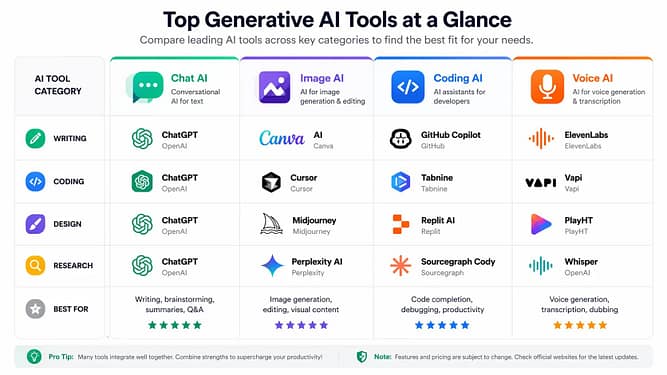
Quick Comparison Table (Top 10 Generative AI Tools)
| Tool | Best For | Free Plan | Paid Starts | TechScore |
|---|---|---|---|---|
| ChatGPT | All-rounder | Yes | $20 (~₹1,600) | 9.5/10 |
| Claude | Long writing | Yes | $20 | 9.2/10 |
| Gemini | Google ecosystem | Yes | $19 | 8.8/10 |
| Midjourney | Images | No | $10 | 9.1/10 |
| Runway | Video AI | Limited | $15 | 8.5/10 |
| GitHub Copilot | Coding | No | $10 | 9.0/10 |
| Perplexity | Research | Yes | $20 | 8.7/10 |
| Notion AI | Productivity | Limited | $10 | 8.2/10 |
| Leonardo AI | Free images | Yes | Paid optional | 8.6/10 |
| ElevenLabs | Voice AI | Limited | $5 | 8.9/10 |
Based on 21-day real usage across writing, coding, and workflows.
(Detailed breakdown below don’t choose from this table alone)
1. ChatGPT
What It Does (Simple)
ChatGPT is the most versatile AI tool right now.
It can write, code, analyze data, brainstorm ideas, and even act like a personal assistant.
Who Should Use It
- Students
- Freelancers
- Developers
- Content creators
- Basically… anyone using the internet seriously
Real Use Case
I used ChatGPT to:
- Write a full SEO blog draft
- Debug a Java API issue
- Create a LinkedIn content strategy
Result: In one test, ChatGPT generated a full 1,200-word blog draft in ~3 minutes. My manual version of a similar post previously took ~2 hours — but required editing to improve tone and accuracy
Pros
- Extremely versatile (one tool = many tasks)
- Best reasoning among general AI tools
- Supports files, images, code
- Huge ecosystem (plugins, integrations)
Cons
- Can still hallucinate (especially facts)
- Paid plan needed for full power
- Overused → less uniqueness if copied blindly
Pricing
Free Plan Limits
- Limited access to advanced models
- Slower during peak times
Paid Plan Value
- ~$20/month (~₹1,600)
- Worth it if you use AI daily
Experience
ChatGPT became my go-to tool very quickly. I used it daily for writing and coding, but the first outputs were rarely perfect. I remember generating a blog draft and thinking, “This sounds too generic.” After adding more context and refining prompts, the quality improved a lot. One mistake I made early was trusting it blindly — especially for facts. Now I always double-check anything important. The biggest win? Speed. Tasks that took 2–3 hours now take 30–40 minutes. But only if you guide it properly.
Expert Verdict
TechScore: 9.5/10
Still the king in 2026.
But not perfect you need to guide it properly.
2. Claude
What It Does (Simple)
Claude is best known for long-form writing and deep thinking tasks.
Think of it as a calmer, more structured version of ChatGPT.
Who Should Use It
- Writers
- Researchers
- Students
- Anyone working with long documents
Real Use Case
I uploaded a 25-page PDF and asked for:
- Summary
- Key insights
- Blog outline
Claude handled it better than most tools.
Pros
- Handles long content extremely well
- More “human-like” writing tone
- Better at structured reasoning
Cons
- Slightly slower
- Not as strong in coding
- Limited integrations compared to ChatGPT
Pricing
Free Plan Limits
- Generous, but capped usage
Paid Plan Value
- ~$20/month
- Great if your focus is writing
Experience
Claude felt different from the start. I tested it with long documents, and it handled them without breaking context, which surprised me. I once uploaded a large PDF and expected a messy summary, but it stayed structured. The downside? It sometimes felt slower when I needed quick answers. Also, for coding tasks, I had to switch back to another tool. I now use Claude only when I’m dealing with heavy reading or long writing.
Expert Verdict
TechScore: 9.2/10
Best tool for deep writing tasks.
But not an all-rounder.
3. Gemini
What It Does (Simple)
Gemini is Google’s AI deeply integrated with Gmail, Docs, and Search.
Who Should Use It
- Google ecosystem users
- Office workers
- Students using Docs/Drive
Real Use Case
I used Gemini inside Google Docs to:
- Rewrite content
- Summarize notes
- Draft emails
Works smoothly inside workflow, not as a standalone powerhouse.
Pros
- Best integration with Google tools
- Real-time data advantage
- Good for everyday productivity
Cons
- Output quality inconsistent
- Not as creative as ChatGPT
- Can feel “restricted” sometimes
Pricing
Free Plan Limits
- Basic usage available
Paid Plan Value
- ~$19/month
- Comes bundled with Google One AI features
Experience
I mostly used Gemini inside Google Docs, and that’s where it made sense. It saved time when rewriting or summarizing content directly in my workflow. But when I tried using it for deeper tasks, the responses felt inconsistent. One day it worked well, the next day… not so much. It’s useful, but I don’t rely on it fully. It’s more like a helper than a main tool.
Expert Verdict
TechScore: 8.8/10
Great assistant… but not the smartest AI.
4. Midjourney
What It Does (Simple)
Midjourney creates high-quality AI images from text prompts.
If you’ve seen ultra-realistic AI art on the internet… there’s a high chance it was made with Midjourney.
Who Should Use It
- Designers
- Content creators
- Bloggers (Pinterest, thumbnails)
- Branding & marketing teams
Real Use Case
I tested Midjourney for:
- Blog feature images
- Pinterest pins
- YouTube thumbnails
Result: Better visuals than most free tools especially for aesthetic + cinematic styles.
Pros
- Industry-leading image quality
- Unique artistic style (not generic AI look)
- Great for branding visuals
Cons
- No proper free plan
- Runs via Discord (not beginner-friendly)
- Prompt learning curve is real
Pricing
Free Plan Limits
- No free plan (trial removed in most regions)
Paid Plan Value
- Starts ~$10/month (~₹800)
- Worth it for creators who need consistent visuals
Experience
Midjourney impressed me, but also frustrated me at first. I remember spending 20 minutes just tweaking prompts to get the right image. Once I figured it out, the results were honestly better than expected. The quality stands out, especially for thumbnails and visuals. But the Discord setup slowed me down in the beginning. Now I use it only when I need high-quality visuals, not for quick tasks.
Expert Verdict
TechScore: 9.1/10
Best for premium visuals, but not beginner-friendly.
5. Runway
What It Does (Simple)
Runway lets you generate and edit videos using AI.
Think: text → video, background removal, motion tracking.
Who Should Use It
- YouTubers
- Reels creators
- Video editors
- Marketing teams
Real Use Case
I tested Runway for:
- Short-form reels
- AI-generated clips
- Background editing
Result: Insane potential… but not fully “plug-and-play” yet.
Pros
- Cutting-edge video AI
- Saves massive editing time
- Great for experimental content
Cons
- Output quality still inconsistent
- Requires editing knowledge
- Can get expensive quickly
Pricing
Free Plan Limits
- Limited credits
- Watermarked exports
Paid Plan Value
- Starts ~$15/month (~₹1,200)
- Pay more as usage increases
Experience
Runway felt powerful, but not simple. I tried generating short videos, and while the results looked cool, they weren’t always usable without editing. It reminded me that AI video is still evolving. I also noticed that credits run out faster than expected. It’s exciting to use, but not something I’d depend on for daily content yet.
Expert Verdict
TechScore: 8.5/10
Future is huge… present still evolving.
6. GitHub Copilot
What It Does (Simple)
GitHub Copilot is an AI coding assistant that writes and suggests code in real-time.
Who Should Use It
- Developers
- Freelancers
- Students learning programming
Real Use Case
I used Copilot for:
- Writing Java backend code
- Auto-completing APIs
- Debugging logic
Result: In my usage, Copilot noticeably reduced time spent on repetitive code by ~30–40%.
Pros
- Massive productivity boost
- Supports multiple languages
- Works inside IDE (VS Code, etc.)
Cons
- Can suggest wrong logic
- Not good for system design
- Paid-only for most users
Pricing
Free Plan Limits
- Free for students (with verification)
Paid Plan Value
- ~$10/month (~₹800)
- Worth it if you code daily
Experience
Copilot helped me write code faster, no doubt. It was great for auto-completing repetitive parts. But one time, it suggested logic that looked correct… and wasn’t. That bug cost me time to fix. Since then, I treat Copilot like a junior developer — helpful, but needs supervision. It saves time, but you still need to think.
Expert Verdict
TechScore: 9.0/10
Best AI for developers but don’t trust blindly.
7. Perplexity AI
What It Does (Simple)
Perplexity is an AI-powered search engine that gives answers with sources.
Who Should Use It
- Researchers
- Bloggers
- Students
- Anyone tired of Google SEO spam
Real Use Case
I used Perplexity for:
- Topic research
- Fact-checking
- Finding sources
Result: Faster than Google for direct answers.
Pros
- Shows sources (big trust factor)
- Fast, clean answers
- Great for research workflows
Cons
- Limited creativity
- Not ideal for content writing
- Sometimes shallow answers
Pricing
Free Plan Limits
- Good enough for basic use
Paid Plan Value
- ~$20/month
- Unlocks advanced models
Experience
Perplexity became my research shortcut. Instead of opening multiple tabs, I got quick answers with sources. But I noticed it sometimes gave surface-level information. So for deeper topics, I still had to dig more. It’s great for starting research, not finishing it.
Expert Verdict
TechScore: 8.7/10
Best for research, not creation.
8. Notion AI
What It Does (Simple)
Notion AI helps you write, organize, and automate notes inside Notion.
Who Should Use It
- Students
- Productivity lovers
- Startup founders
- Knowledge workers
Real Use Case
I used Notion AI to:
- Summarize notes
- Create task lists
- Draft content
Result: Smooth workflow… but not as powerful as standalone AI tools.
Pros
- Seamless integration with Notion
- Good for daily productivity
- Saves time on repetitive tasks
Cons
- Weak compared to ChatGPT
- Limited creativity
- Paid add-on
Pricing
Free Plan Limits
- Very limited AI usage
Paid Plan Value
- ~$10/month (~₹800)
- Only worth if you already use Notion
Experience
I used Notion AI mainly for organizing messy notes. It worked well for summaries and task lists. But when I tried generating detailed content, it didn’t match standalone AI tools. It’s useful only if you already use Notion regularly. Otherwise, it feels limited.
Expert Verdict
TechScore: 8.2/10
Great add-on… not a primary AI tool.
9. Leonardo AI
What It Does (Simple)
Leonardo AI is a free-friendly image generation tool focused on speed, control, and game/asset-style visuals.
It’s like a more accessible alternative to Midjourney.
Who Should Use It
- Beginners in AI image generation
- Indie game developers
- Bloggers (thumbnails, Pinterest)
- Creators who want free credits daily
Real Use Case
I used Leonardo AI for:
- Blog featured images
- UI mockups
- Character-style visuals
Result: Surprisingly good quality for a free tool especially for structured and repeatable designs.
Pros
- Generous free plan (daily credits)
- Easier UI than Midjourney
- More control over styles and models
Cons
- Output not as “cinematic” as Midjourney
- Requires prompt tuning
- Sometimes inconsistent
Pricing
Free Plan Limits
- Daily token-based usage
- Enough for light creators
Paid Plan Value
- Optional upgrades (~$10–$24)
- Only needed for heavy usage
Experience
Leonardo was my backup when I didn’t want to pay for image tools. It gave decent results quickly, especially for blog visuals. But sometimes outputs looked a bit “AI-like.” Still, for a free tool, it saved me multiple times when I needed quick graphics.
Expert Verdict
TechScore: 8.6/10
Best free image AI tool right now.
10. ElevenLabs
What It Does (Simple)
ElevenLabs generates ultra-realistic AI voiceovers.
You can convert text into human-like speech in multiple languages and tones.
Who Should Use It
- YouTubers
- Podcasters
- Faceless content creators
- Course creators
Real Use Case
I tested ElevenLabs for:
- YouTube narration
- Short-form content voiceovers
Result: The voice quality felt more natural than most AI voice tools I’ve tried.
Pros
- Very natural voice quality
- Multiple voices & styles
- Fast generation
Cons
- Free plan is very limited
- Ethical concerns (voice cloning misuse)
- Requires editing for perfect output
Pricing
Free Plan Limits
- Very limited characters
Paid Plan Value
- Starts ~$5/month (~₹400)
- Scales with usage
Experience
The first time I used ElevenLabs, I actually replayed the audio twice. It sounded that real. I used it for voiceovers, and it worked well, but not perfectly. Some lines needed tweaking to sound natural. Also, the free plan runs out fast. It’s powerful, but you need to edit outputs for best results.
Expert Verdict
TechScore: 8.9/10
Best voice AI but use responsibly.
Head-to-Head Comparisons
ChatGPT vs Claude
Quick answer:
- ChatGPT = all-rounder
- Claude = long writing specialist
Real difference:
- ChatGPT is better for:
- Coding
- Ideas
- Versatility
- Claude is better for:
- Long documents
- Clean writing
- Structured outputs
If you can afford one: ChatGPT
If you write daily: Claude
Midjourney vs Leonardo AI
Quick answer:
- Midjourney = quality
- Leonardo = flexibility + free
Real difference:
- Midjourney:
- Better aesthetics
- Harder to use
- Leonardo:
- Easier UI
- More control
Beginners → Leonardo
Professionals → Midjourney
Copilot vs ChatGPT (for Coding)
Quick answer:
- Copilot = real-time coding
- ChatGPT = problem solving
Best combo = use both together
How to Choose the Right Tool (Don’t Overthink This)

If you’re confused, use this:
If you are a…
Student
- ChatGPT + Gemini
- Optional: Notion AI
Freelancer
- ChatGPT + Claude
- Add Midjourney (for design work)
Developer
- GitHub Copilot + ChatGPT
Content Creator
- ChatGPT + Midjourney + ElevenLabs
Researcher / Blogger
- Perplexity + Claude
If your goal is not just learning but actually earning with these tools, you should understand which tech skills generate real income.
Simple Rule Most People Miss
Don’t try 10 tools.
Pick 2–3 tools max and master them.
That’s where real productivity happens.
Tools That Didn’t Make the List (And Why)
Jasper AI
- Too expensive
- No strong advantage over ChatGPT
Copy.ai
- Good… but outdated
- Generic outputs
Writesonic
- Decent, but inconsistent
These tools are not bad just not top-tier in 2026 anymore
Where AI Is Heading by the End of 2026
AI is already shifting fast in 2026 — but based on what I’ve seen during testing, here’s where things are heading next.
Here’s what’s coming:
1. AI Agents Are Starting to Replace Repetitive Work
Tools are already beginning to act on your behalf — handling tasks, emails, and simple workflows.
- Tools will act on your behalf
- Example: AI managing emails, tasks, workflows
2. Multi-Modal AI Is Becoming Standard
Tools are increasingly combining text, images, video, and voice into one workflow.
- Text + image + video + voice together
- Not separate tools anymore
3. AI Pricing Is Already Increasing
Free plans are getting tighter, and most serious usage now requires paid tiers.
- Big players will dominate:
- OpenAI
- Anthropic
Smaller tools may struggle unless niche-focused
Final Verdict (Top 3 Picks)
If you want the best ROI tools in 2026, start here:
1 ChatGPT
Best overall tool no competition yet.
2 Claude
Best for writing and deep thinking.
3 Midjourney
Best for visual content.
Bonus Combo (Most Powerful Setup)
ChatGPT + Midjourney + Copilot
Used correctly, this combo can handle a large part of what junior writers, designers, and developers do — but still requires human direction and review.
FAQs (Frequently Asked Questions)
1. What is a generative AI tool?
A generative AI tool is software that creates new content such as text, images, audio, or code based on user input. These tools use machine learning models trained on large datasets to predict and generate outputs. Common examples include chatbots, image generators, and code assistants. They do not “think” like humans but generate responses based on patterns in data. Their accuracy depends on training data and user input.
Source: IBM – https://www.ibm.com/topics/generative-ai
2. Are generative AI tools free to use?
Some generative AI tools offer free plans, but they usually come with limitations such as usage caps, slower performance, or restricted features. Paid plans unlock advanced models, faster responses, and higher usage limits. Pricing varies by tool and region, and some tools may adjust costs based on demand or features. It’s important to check official pricing pages before choosing a tool.
Source: OpenAI Pricing – https://openai.com/pricing
Source: Google One AI – https://one.google.com/about/ai-premium/
3. Can generative AI replace human jobs?
Generative AI can automate specific tasks like writing drafts, coding assistance, or content generation, but it does not fully replace human roles. Most industries still require human judgment, creativity, and decision-making. According to research, AI is more likely to augment jobs rather than eliminate them entirely. The impact varies depending on the industry and skill level.
Source: World Economic Forum – https://www.weforum.org/stories/2026/01/how-ai-will-affect-work-in-different-industries/
4. Is content created by AI accurate and reliable?
AI-generated content can be helpful but is not always fully accurate. These systems may produce incorrect or outdated information, often called “hallucinations.” Users should verify important facts using trusted sources before relying on AI outputs. Accuracy improves when users provide clear prompts and context, but manual review is still necessary.
Source: OpenAI Help Center – https://help.openai.com/en/articles/8313428-accuracy-and-reliability
5. Which generative AI tool is best in 2026?
There is no single “best” tool for all use cases. Different tools are designed for different purposes, such as writing, coding, or image generation. The right choice depends on user needs, budget, and workflow. As of 2026, there is no official ranking from any authority that confirms one tool as universally best.
Final Thought
Most people are still “trying AI.”
Very few are actually using it properly.
That gap is your opportunity.
Share this:

Discover more from GroWithMoney
Subscribe to get the latest posts sent to your email.