Every fresher learns Java.
Many learn Spring Boot.
But only a few build real-world projects that actually impress recruiters.
That’s the difference between someone who gets shortlisted and someone who gets ignored.
An IPL Player Stats app using Java & Spring Boot is one of the best portfolio projects you can build in 2026. It combines sports data, APIs, backend development, and real-world architecture into a single project.
And the best part?
You don’t need advanced experience to build it.
In this guide, you’ll learn how to create a complete IPL player stats application step by step, including:
- Project structure
- API integration
- Database design
- Backend development
- Deployment
- Resume and portfolio usage
By the end, you’ll have a production-ready portfolio project that can help you in placements and internships.
Building real-world applications like this IPL Player Stats App is important because recruiters often look at practical projects when evaluating candidates. You can also explore more ideas in our Java Developer Portfolio Projects That Get You Hired in 2026 guide.
Why Build an IPL Player Stats App?
Recruiters don’t just look at certificates.
They look for real-world problem-solving skills.
An IPL Player Stats App shows the following:
- API handling
- Backend logic
- Database design
- REST API creation
- Data processing
- Deployment knowledge
This makes your profile stand out from basic CRUD projects.
Real Impact on Resume
Instead of writing “Built Java project”
You can write: Developed IPL Player Stats Application using Java Spring Boot with REST APIs, a MySQL database, and live cricket data integration.
That immediately looks professional.
What is an IPL Player Stats App?
An IPL Player Stats App is a backend-based application that provides the following:
- Player statistics
- Team details
- Match performance
- Runs, wickets, strike rate
- Season performance
- Rankings and comparisons
Users can search and analyze players like the following:
- Top run scorers
- Best bowlers
- Team-wise stats
- Player performance
This is similar to sports analytics platforms.
Technologies You Will Use: The Core Technologies
Java
Main programming language for backend logic.
Spring Boot
Used to build REST APIs and application structure.
MySQL
Stores player data and statistics.
Maven
Dependency management and project build.
REST API
Fetch and serve IPL data.
Git & GitHub
Version control and portfolio showcase.
Project Architecture
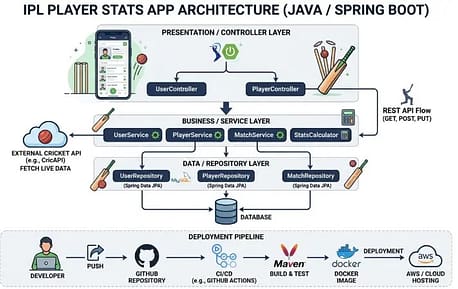
Controller Layer—Handles API requests
Service Layer—Business logic
Repository Layer—Database operations
Database stores player stats
External API: Provides IPL data
Step-by-Step Development Guide
Step 1: Create Spring Boot Project
Go to Spring Initializr
Add dependencies:
- Spring Web
- Spring Data JPA
- MySQL Driver
- Lombok
Generate project and open in IDE.
Step 2: Create Player Entity
Create a Player model.
Fields:
- ID
- name
- team
- matches
- runs
- wickets
- strikeRate
- average
This represents player data.
Step 3: Create Repository Layer
Create PlayerRepository.
Use JpaRepository.
This helps in:
- saving data
- fetching data
- updating stats
- deleting records
Step 4: Create Service Layer
Service handles logic like:
- get all players
- get player by name
- top scorers
- best bowlers
- team stats
This is where business logic is written.
Step 5: Create Controller
Create REST endpoints.
Example:
GET /players
GET /players/top-scorers
GET /players/team/{team}
GET /players/best-bowlers
Now the application can return IPL stats.
Step 6: IPL Data API Integration
You can fetch real IPL data from cricket APIs.
Popular Cricket APIs
These APIs provide:
- player stats
- match data
- team info
- scorecards
You fetch data and store it in the database.
Sample Player Data
{
“name”: “Virat Kohli”,
“team”: “RCB”,
“matches”: 237,
“runs”: 7263,
“wickets”: 4,
“strikeRate”: 130.4,
“average”: 37.2
}
Step 7: Database Design
Player Table
ID, name, team, runs, wickets, matches, strike rate, average
Team Table
ID, team_name, wins, losses
This helps manage structured data.
Step 8: Advanced Features to Add
To make the project strong, add:
Player Comparison
Compare two players.
Team Ranking
Top teams by performance.
Season Stats
IPL 2024, 2025, and 2026 data.
Search Feature
Search player by name.
Filter
Top run scorers
Top bowlers
Most matches
These features make the project industry-level.
Step 9: Frontend
You can use:
- React
- HTML, CSS
- Thymeleaf
Create dashboard:
- player list
- stats charts
- team rankings
- search bar
This makes the project visually attractive.
Step 10: Deploy the Application
Deployment increases credibility.
Platforms
Upload project to GitHub.
Deploy backend.
Share the live link.
Now recruiters can see your project.
How to Add This Project to Your Resume
Resume Description
Built an IPL player stats application using Java and Spring Boot with REST API integration and MySQL database. Implemented player analytics, team rankings, and cricket data API integration. Deployed project on cloud platform and hosted on GitHub.
GitHub Structure
README should include:
Project overview
Features
Tech stack
API endpoints
Screenshots
Live link
Setup guide
This improves recruiter trust.
Why Recruiters Like This Project
Real-world use case
Sports analytics is practical.
API integration
Shows backend knowledge.
Database design
Demonstrates structure.
Deployment
Shows production readiness.
Clean architecture
Shows industry standards.
This makes you job-ready.
Interview Questions From This Project
- What is Spring Boot?
- What is a REST API?
- How does JPA work?
- What are the controller and service layers?
- How does a database connection work?
- How do you deploy a Spring Boot app?
Before the interview, prepare for all these important questions.
Key Takeaways
- IPL Player Stats App is a strong Java Spring Boot portfolio project
- It shows API, database, and backend skills
- You can deploy it on cloud platforms
- Adding frontend improves impact
- Recruiters prefer real-world projects over basic CRUD
- This project can boost placement chances
Download Full Project + Code + API Collection- ipl_player_stats_project
External Authority References
FAQ (Frequently Asked Questions)
1. Do I need Spring Boot to build an IPL player stats app in Java?
No, Spring Boot is not strictly required, but it is widely recommended for building modern Java backend applications. Spring Boot simplifies REST API development, dependency management, and database integration, which makes it suitable for portfolio and real-world projects. According to official documentation, Spring Boot reduces boilerplate configuration and helps developers build production-ready applications quickly. Using it also aligns your project with industry standards used in backend development.
Source: Spring Official Documentation
2. Where can I get IPL player data for building this project?
IPL player data can be obtained through cricket data APIs such as CricAPI, RapidAPI Cricket API, or SportdataAPI. These APIs provide structured cricket data, including player statistics, match details, and team information through REST endpoints. Most of these platforms require API keys and may have usage limits on free plans. Developers should review API documentation and terms of use before integrating the data into applications.
Source: RapidAPI
Source: CricAPI
3. Is this project suitable for beginners in Java and Spring Boot?
Yes, this project is suitable for beginners who already understand basic Java, object-oriented programming, and REST API concepts. Spring Boot provides structured project templates and extensive documentation that help new developers build backend applications step by step. However, beginners may need time to learn database integration and API handling. Official Spring Boot guides and tutorials are designed to support entry-level developers.
Source: Spring Guides
4. Can I deploy this IPL player stats app for free?
Yes, developers can deploy Spring Boot applications on free-tier platforms such as Render, Railway, or similar cloud services. These platforms allow hosting of backend applications with limited resources under free plans. However, free plans may include restrictions like limited uptime, memory usage, or sleep mode during inactivity. Developers should check the latest pricing and usage policies on the platform’s official website before deployment.
Source: Render Documentation
Source: Railway Documentation
5. Will this project help in getting a Java developer job?
A well-structured portfolio project can improve a candidate’s chances of getting shortlisted because recruiters often evaluate practical coding skills through GitHub projects and real-world applications. Industry hiring guides from developer platforms emphasize that projects demonstrating REST APIs, databases, and deployment show practical experience. However, a project alone does not guarantee a job; candidates also need strong fundamentals, coding skills, and interview preparation. There is no official guarantee from any company that a specific project ensures placement.
Source: GitHub Docs
Source: Oracle Java Documentation
Source: Spring Career & Developer Resources
Discover more from GroWithMoney
Subscribe to get the latest posts sent to your email.