You picked the wrong IDE three years ago.
Your colleague switched to IntelliJ and now ships features faster.
You’re still waiting for Eclipse to index your project.
That’s not just frustrating — it’s expensive in terms of time, productivity, and career growth.
In 2026, your IDE is no longer just a coding tool.
It’s a productivity multiplier powered by AI, automation, and smart refactoring — and choosing the Best Java IDE 2026 can directly impact how fast you build, debug, and ship software.
This article tests real workflows — not marketing claims.
You’ll see:
- Real-world use case benchmarks
- AI-powered IDE comparison
- Developer persona recommendations
- Honest verdict on which IDE actually makes you faster
So if you’re a student, freelancer, or enterprise developer, this guide will help you choose the right Java IDE.
If you’re just starting, follow this Java roadmap for freshers to understand the full learning path before choosing tools.
Quick Answer Box
| Developer Type | Best IDE |
|---|---|
| Enterprise / Spring Boot | IntelliJ IDEA Ultimate |
| Budget-conscious / Freelancer | IntelliJ Community or VS Code |
| Beginner | VS Code |
| Legacy Java EE | Eclipse |
| AI-first developer | Cursor or IntelliJ + AI Assistant |
Why IDE Choice Matters More in 2026 (Best Java IDE 2026)
The Java IDE landscape has changed significantly.
Recent developer surveys show:
- IntelliJ IDEA dominates Java development usage
- VS Code continues to growing rapidly
- Eclipse usage is declining in modern workflows
The biggest shift?
AI integration.
Earlier, IDEs were judged on:
- code completion
- debugging
- performance
Now they are judged on:
- AI assistance
- automation
- smart refactoring
- workflow speed
Switching IDEs mid-project is painful.
That’s why choosing the right IDE at the beginning matters.
In 2026, your IDE’s AI capability is as important as its performance.
Many developers are still choosing Java as their primary language.
If you’re unsure about the future, read Is Java still worth learning in 2026 to understand the real market demand.
The Contenders (Quick Snapshot)
IntelliJ IDEA
One of the most powerful Java IDEs with the following:
- smart code completion
- deep refactoring tools
- Spring Boot integration
- advanced debugging
- built-in AI support
Downside:
- heavy on RAM
- The ultimate version is paid
Best for:
- Spring Boot developers
- enterprise teams
- serious Java engineers
IntelliJ is widely used by Spring Boot developers because of deep framework support.
If you’re planning to build backend applications, follow this Spring Boot roadmap for freshers to get started.
Eclipse
A classic open-source Java IDE.
Strengths:
- free
- strong plugin ecosystem
- good for enterprise and legacy systems
Weakness:
- outdated UI
- slower in large projects
Best for:
- legacy Java EE teams
- enterprise environments
VS Code
Lightweight and fast editor with Java support via extensions.
Strengths:
- very fast startup
- low RAM usage
- great for beginners
- strong AI integration
Weakness:
- Java support depends on extensions
Best for:
- students
- freelancers
- low-spec machines
Cursor (AI-First IDE)
A new generation IDE focused on AI workflows.
Key idea:
- AI writes code
- AI refactors
- AI assists in debugging
- agent-based coding
Best for:
- AI-first developers
- automation-focused workflows
Real Benchmarks (5 Use Case Scenarios)
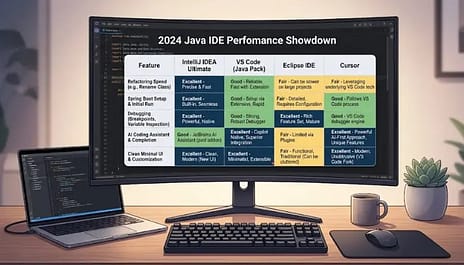
This is where things get interesting.
Use Case 1: Refactoring Large Codebase
Scenario:
Renaming a method used in 200+ files.
| IDE | Performance |
|---|---|
| IntelliJ | instant preview and safe rename |
| Eclipse | slower and manual checks |
| VS Code | inconsistent |
| Cursor | depends on AI assistance |
Winner: IntelliJ IDEA
Why?
Because IntelliJ has deep code analysis and cross-module awareness.
Use Case 2: Spring Boot Project Setup
Scenario:
Create a REST API from scratch.
| IDE | Experience |
|---|---|
| IntelliJ Ultimate | built-in Spring Initializr |
| VS Code | extension-based |
| Eclipse | manual setup |
Winner: IntelliJ Ultimate
Reason:
Spring support is built directly into IntelliJ.
Use Case 3: Low-Spec Laptop
Scenario:
8GB RAM laptop.
| IDE | Performance |
|---|---|
| VS Code | very fast |
| IntelliJ | heavy |
| Eclipse | moderate |
Winner: VS Code
Reason:
Lightweight architecture.
Use Case 4: Debugging Multi-threaded App
| IDE | Debugging |
|---|---|
| IntelliJ | best thread visualization |
| Eclipse | strong debugger |
| VS Code | limited |
Winner: IntelliJ
Use Case 5: AI-Assisted Coding
| IDE | AI Support |
|---|---|
| IntelliJ + AI Assistant | context-aware |
| VS Code + Copilot | strong |
| Cursor | AI-native |
| Eclipse | weak |
Winner: IntelliJ + Cursor
Who Should Use Which IDE?
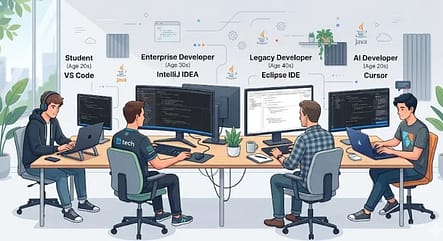
| Persona | Recommended IDE | Reason |
|---|---|---|
| CS Student | VS Code | simple and free |
| Freelancer | IntelliJ Community | smart refactoring |
| Spring Boot Developer | IntelliJ Ultimate | deep framework support |
| Enterprise Developer | Eclipse | legacy support |
| AI-first Developer | Cursor | automation |
| Low-spec Laptop User | VS Code | lightweight |
Hidden Productivity Features Most Developers Miss
IntelliJ
- Structural Search & Replace
- Live Templates
- Smart Refactoring
Official link: intellij
These can save hours weekly.
VS Code
- Remote Development
- Dev Containers
- Extension ecosystem
Official link: VSCODE
Great for remote teams.
Eclipse
- Working Sets
- Incremental Compiler
- Plugin customization
Official link: Eclipse
Useful for large enterprise projects.
Pricing Breakdown
| IDE | Free | Paid | Worth It |
|---|---|---|---|
| IntelliJ Community | Yes | No | Yes |
| IntelliJ Ultimate | No | ~$24/month | Yes |
| Eclipse | Yes | No | Yes |
| VS Code | Yes | No | Yes |
| Cursor | Limited | ~$20/month | Yes |
JetBrains also offers free student licenses.
Key Takeaways
- IntelliJ is the fastest for professional Java development
- VS Code is best for beginners and low-spec machines
- Eclipse is strong for legacy enterprise systems
- The cursor is rising in AI-driven coding
- AI integration now decides IDE speed
Most important:
Master one IDE deeply. That’s what actually makes you faster.
Experience Using These Java IDEs
I’ve switched between IntelliJ, Eclipse, and VS Code more times than I’d like to admit. At one point, I was using Eclipse for a Spring Boot project and spent more time waiting for indexing than actually writing code. That’s when I realized the IDE you choose quietly affects your daily mood.
When I moved to IntelliJ, refactoring felt smoother and debugging stopped being a headache. VS Code, on the other hand, saved me on an old 8GB laptop where IntelliJ used to make the fan sound like a helicopter.
The biggest lesson? No IDE is perfect. IntelliJ gives power, VS Code gives speed, and Eclipse gives stability in legacy setups.
What really matters is consistency. Once you learn shortcuts, templates, and debugging deeply, your productivity jumps naturally.
And yes, learning shortcuts saves more time than buying a faster laptop.
FAQ (Featured Snippet Optimized)
1. Which Java IDE is fastest in 2026?
There is no official benchmark that declares a single “fastest” Java IDE in 2026 because performance depends on hardware, project size, and workflow. However, independent developer surveys and documentation consistently show that IntelliJ IDEA is widely preferred for large-scale Java projects due to its advanced code analysis and refactoring tools, while VS Code is known for faster startup and lower memory usage. Eclipse remains stable for enterprise and legacy systems but may feel slower in modern large projects. So, speed varies by use case rather than a universal winner.
Source:
2. Is IntelliJ IDEA free?
Yes, IntelliJ IDEA has a free version called IntelliJ IDEA Community Edition. This version supports core Java development and is suitable for students, beginners, and many professional developers. The paid version, IntelliJ IDEA Ultimate, includes advanced features such as Spring Boot support, enterprise tools, and web development frameworks. JetBrains also offers free Ultimate licenses to students through its official student program.
Source:
3. Can VS Code replace IntelliJ for Java development?
VS Code can be used for professional Java development, especially for small to medium projects and microservices. Microsoft provides official Java extensions that support debugging, Maven/Gradle, and IntelliSense features. However, IntelliJ IDEA offers deeper static code analysis, built-in framework support, and advanced refactoring tools, which many enterprise teams rely on. So, VS Code can replace IntelliJ in lightweight workflows, but not always in complex enterprise environments.
Source:
4. Which IDE do most Java developers use in 2026?
Most Java developers use IntelliJ IDEA, based on recent JetBrains Developer Ecosystem surveys and Stack Overflow Developer Survey trends. These reports consistently show IntelliJ IDEA as the most widely used Java IDE, followed by VS Code and Eclipse. However, usage can vary by region, company size, and project type. There is no single global number for 2026, but surveys indicate IntelliJ remains the dominant choice.
Source:
5. Which Java IDE is best for Spring Boot?
IntelliJ IDEA Ultimate is generally considered the best IDE for Spring Boot because it provides built-in Spring Initializr, configuration assistance, and framework-aware code completion. The official Spring documentation also highlights IntelliJ IDEA and VS Code as recommended tools for Spring development. VS Code supports Spring Boot through extensions, but requires more setup compared to IntelliJ. The best choice depends on budget and project complexity.
Source:
Still confused? Choose this:
- 8GB RAM laptop → VS Code
- Spring Boot developer → IntelliJ IDEA
- Old laptop → VS Code
- Enterprise Java → IntelliJ or Eclipse
- Beginner → VS Code or IntelliJ Community
- AI coding → Cursor
- Stable long-term project → IntelliJ
Final Recommendation
If you want the safest option in 2026:
- Beginner → VS Code
- Spring Boot → IntelliJ
- AI coding → Cursor
- Enterprise → IntelliJ or Eclipse
Conclusion
Your IDE is your coding environment.
Choose wisely.
- Want speed → IntelliJ
- Want simplicity → VS Code
- Want legacy stability → Eclipse
- Want AI automation → Cursor
The best IDE is the one you master deeply.
Because productivity doesn’t come from tools.
It comes from how well you use them.
Discover more from GroWithMoney
Subscribe to get the latest posts sent to your email.