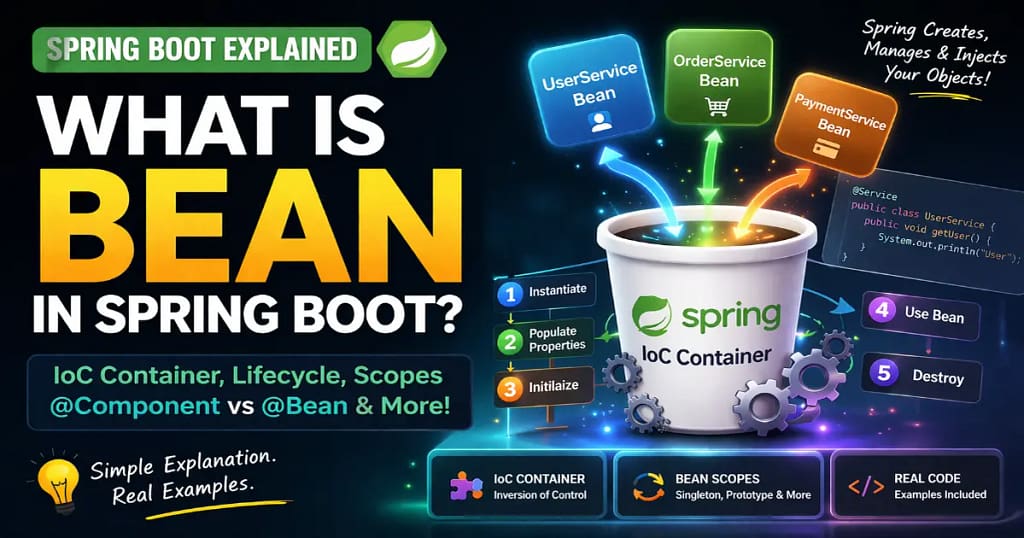
When most freshers start learning Spring Boot, one question keeps coming again and again:
What is Bean in Spring Boot, and why does Spring automatically create objects?
In college, we create objects using new keywords.
Student student = new Student();
Simple and clear.
But in Spring Boot tutorials, you suddenly see the following:
- Spring Bean
- IoC Container
- @Component
- @Bean
- Dependency Injection
- Auto-created objects
And now confusion starts.
Freshers preparing for TCS, Infosys, Wipro, Cognizant, and backend developer interviews often struggle with this concept because Spring Boot hides object creation.
This article will explain what is bean in Spring Boot in the simplest possible way with real examples, mistakes, and interview answers.
If you are new to backend development, you should first understand What is Spring Boot in Java, because Beans and IoC container are core parts of the Spring Boot architecture.
A Real Fresher Mistake
Rahul, a 2025 CSE graduate, was building his first Spring Boot project.
He created a service class:
public class StudentService {
public void getStudent() {
System.out.println(“Student data”);
}
}
Then in controller:
@RestController
public class StudentController {@Autowired
StudentService studentService;
}
When he ran the project, an error appeared:
He was confused.
- Class exists
- The code looks correct
- Still error
After searching for hours, he found the solution:
@Service
public class StudentService {
}
And suddenly everything worked.
So what changed?
Spring was unable to create an object of StudentService.
After adding @Service, Spring created a bean.
That is where the concept of Spring Bean comes in.
What is Bean in Spring Boot?
A bean in Spring Boot is an object that is created, managed, and controlled by the Spring IoC container.
That’s it.
Normal Java Object
You create and manage it.
Spring Bean
@Component
public class Student {
}
Spring creates and manages it.
Interview-Ready Definition
A Spring bean is a Java object that is instantiated, configured, and managed by the Spring IoC container.
3-line answer for interviews:
- A bean is an object in Spring Boot
- Created and managed by IoC container
- Used for Dependency Injection
This question is commonly asked in
- TCS NQT interviews
- Infosys Spring Boot rounds
- Cognizant backend interviews
- Java developer interviews
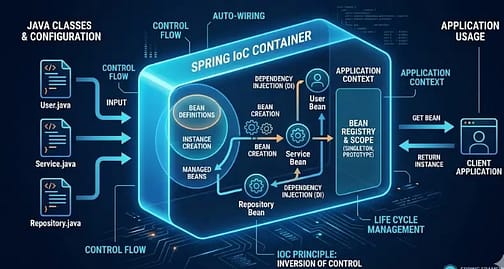
Understanding Spring IoC Container (With Real-Life Analogy)
Now comes the main concept.
What is an IoC container?
IoC means Inversion of Control.
Normally, we control object creation.
In Spring, container controls object creation.
Spring IoC container creates and manages objects automatically, which directly connects to Dependency Injection in Spring Boot, because beans are used to inject dependencies into different layers of the application.
Real-Life Example
Without Spring
You cook food yourself.
- Buy vegetables
- Cook food
- Serve food
You control everything.
With Spring IoC Container,
You go to a restaurant.
- You order food
- The restaurant prepares food
- The waiter serves food
You only use it.
Spring works like a restaurant.
You request an object.
Spring creates it and gives it.
Spring IoC Container Responsibilities
- Create objects
- Manage objects
- Inject dependencies
- Control lifecycle
- Handle configuration
Dependency injection in Spring Boot, which forms the core of Spring architecture, deeply connects with this concept.
This concept originally comes from the Spring Framework, and if you are confused about how Spring and Spring Boot differ, you can read Spring vs Spring Boot: 7 Key Differences to understand the architectural differences.
How Spring Creates Beans
Spring creates beans automatically using annotations.
Example:
@Component
public class StudentService {
public void getStudent() {
System.out.println(“Student data”);
}
}
Spring scans this class and creates beans.
Then injects it into the controller.
StudentService studentService;
No need for a new keyword.
Spring Boot Bean Lifecycle (Step-by-Step)
Understanding the lifecycle helps in interviews and debugging.
Bean Lifecycle Flow
- Spring starts
- Scans classes
- Creates bean
- Injects dependencies
- Initializes bean
- Bean is ready to use
- Destroyed when application stops
Code Example
@Component
public class StudentService {@PostConstruct
public void init() {
System.out.println(“Bean created”);
}@PreDestroy
public void destroy() {
System.out.println(“Bean destroyed”);
}
}
Output
- Bean created
- Bean destroyed
Interview Tip
What is the Spring bean lifecycle?
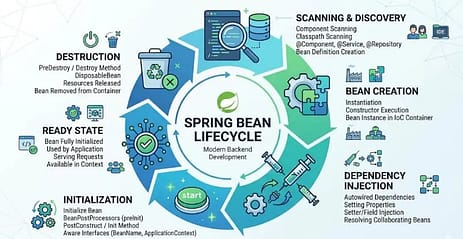
Answer:
- Bean creation
- Dependency injection
- Initialization
- Ready to use
- Destruction
Short and clear.
Spring Bean Scope
Bean scope decides how many objects Spring creates.
Types of Bean Scope
1. Singleton (Default)
Only one object is created.
@Component
@Scope(“singleton”)
public class StudentService {
}
Used in:
- Service
- Repository
- Controller
Most common.
2. Prototype
New object every time.
@Component
@Scope(“prototype”)
public class StudentService {
}
Used in:
- Temporary objects
- Dynamic data
3. Request Scope
Used in web applications.
New object per request.
4. Session Scope
New object per session.
Interview Question
Default scope in Spring Boot?
Answer: Singleton.
4 Ways to Create Beans in Spring Boot
This is a high-value section for freshers.
1. Using @Component
@Component
public class StudentService {
}
Spring automatically creates beans.
2. Using @Service
@Service
public class StudentService {
}
Used for business logic.
3. Using @Repository
@Repository
public class StudentRepository {
}
Used for database layer.
4. Using @Bean Annotation
@Configuration
public class AppConfig {@Bean
public Student student() {
return new Student();
}
}
Used for manual bean creation.
When to Use @Bean?
- External library classes
- Custom configuration
- Third-party objects
Backend developer interviews frequently ask about this topic.
@Component vs @Bean vs @Service vs @Repository
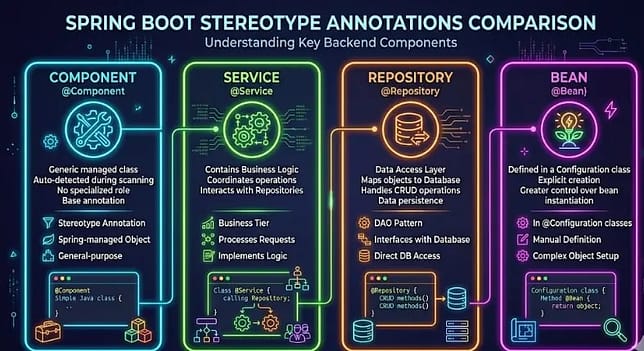
| Annotation | Purpose | Used In | Automatic Bean |
|---|---|---|---|
| @Component | General class | Utility | Yes |
| @Service | Business logic | Service layer | Yes |
| @Repository | Database layer | DAO | Yes |
| @Bean | Manual creation | Config class | Yes |
Simple Rule
- Business logic → @Service
- Database → @Repository
- General class → @Component
- External object → @Bean
Component Scanning (How Spring Finds Beans)
Spring automatically scans packages.
Example:
@SpringBootApplication
public class App {
}
This enables component scanning.
Spring scans:
- Controller
- Service
- Repository
- Component
and creates beans.
Beans are created inside Spring Boot projects, and most projects are generated using Spring Boot Initializr, which sets up the project structure and enables component scanning automatically.
If the package is Outside
Use:
This concept connects with what Spring Boot and Spring Boot Initializr are, because Initializr sets package structure automatically.
Common Mistakes Freshers Make
This chapter is the most important section.
1. No Qualifying Bean Error
Error: No qualifying bean of type
Why it happens
- No annotation
- Wrong package
- Bean not created
Fix
Add: @Service or @Component
2. Circular Dependency
Example:
Service A uses Service B
Service B uses Service A
Spring cannot create beans.
Fix
Use constructor injection.
@Service
public class A { private B b; public A(B b) {
this.b = b;
}
}
3. Wrong Annotation Usage
Using @Component instead of @Service
Not wrong, but an undesirable practice.
Interviewers expect layer-based annotations.
4. Bean Outside Scan Package
Spring cannot detect class.
To resolve this, please consider moving the class inside the main package or utilizing @ComponentScan.
Interview Questions
1. What is Bean in Spring Boot?
A bean is a Java object managed by the Spring IoC container and used for dependency injection.
2. What is an IoC container?
An IoC container creates and manages Spring beans automatically.
3. Difference between @Component and @Bean?
@Component is automatic bean creation.
@Bean is manual bean creation.
4. Default Bean Scope?
Singleton.
5. What is a bean lifecycle?
Creation → Injection → Initialization → Ready → Destruction.
Frequently Asked Questions (FAQ)
1. What is a Bean in Spring Boot?
A Bean in Spring Boot is a Java object that is created, configured, and managed by the Spring IoC (Inversion of Control) container. Instead of manually creating objects using the new keyword, Spring automatically instantiates and manages these objects during application startup. Beans are typically defined using annotations like “bean” or @Bean in a configuration class. The IoC container also handles dependency injection and lifecycle management of these beans. This behavior is defined in the official Spring Framework documentation.
Source: Spring Documentation
2. How does the Spring IoC container work?
The Spring IoC container scans the application for classes marked with specific annotations and creates objects (beans) from them automatically. It reads configuration metadata (annotations, XML, or Java configuration) and manages object creation, dependency injection, and lifecycle. The container ensures that required dependencies are injected into beans at runtime, reducing manual object management. This mechanism promotes loose coupling and modular design in Spring applications. The official Spring documentation explains IoC as the core container responsible for managing beans and dependencies.
Source: Spring Documentation
3. What is the difference between @Component and @Bean in Spring Boot?
@Component is used to automatically detect and register a class as a Spring Bean through component scanning. It is applied directly to the class, and Spring creates the object during application startup. @Bean On the other hand, is used inside a @Configuration class to manually define a bean and return the object explicitly. This approach is useful for third-party libraries or custom configurations where annotations cannot be added to the class. Both methods create Spring-managed beans but differ in how they are declared and controlled.
Source: Spring Documentation
4. What is the default scope of a Spring Bean?
The default scope of a Spring bean is singleton, which means only one instance of the bean is created and shared across the entire application. Every time the bean is requested, the same instance is returned by the IoC container. Depending on the situation, Spring can also use other scopes, such as prototype, request, session, and application. Singleton scope is the most commonly used because it reduces memory usage and improves performance. This behavior is officially documented in Spring’s bean scope documentation.
Source: Spring Documentation
5. Can multiple beans of the same class exist in Spring Boot?
Yes, multiple beans of the same class can exist in Spring Boot if they are defined with different names or configurations. This is usually done using multiple @Bean methods or qualifiers, such as @Qualifier distinguishing between them. When multiple beans of the same type exist, Spring requires explicit identification to avoid ambiguity during dependency injection. If no qualifier is specified, Spring may throw one. The official documentation explains this behavior in the context of bean resolution and autowiring.
Source: Spring Documentation
Conclusion
A Spring bean is simply a Java object managed by the Spring IoC container.
It helps in automatic object creation, dependency injection, and lifecycle management.
Understanding Beans makes Spring Boot much easier and helps freshers crack backend interviews.
If you want to understand how beans are injected into controllers and services, you should read Dependency Injection in Spring Boot, which explains constructor injection, field injection, and real project usage.