Starting your first Spring Boot project often feels confusing.
Freshers usually open their IDE and stare at a blank screen, wondering what files to create, what dependencies to add, and how to structure the project.
This guide removes that confusion completely.
In the next 5 minutes, you’ll learn how to use Spring Boot Initializr to create a fully working project, import it into your IDE, and run your first application without errors.
By the end, you’ll have a real Spring Boot project running on your system.
What is Spring Boot Initializr?
Spring Boot Initializr is an official web-based tool that helps developers generate a ready-to-run Spring Boot project instantly.
Instead of manually creating folders and configuration files, Initializr builds everything automatically.
It gives you a clean project structure with selected dependencies and build tools.
This saves time and reduces setup errors.
If you are new to Spring Boot, you should first understand What is Spring Boot in Java before creating your first project.
You can also follow the Spring Boot Roadmap for Freshers 2026 to learn the complete backend development journey.
The Official URL and What it Does
Official website: https://start.spring.io/
This tool allows you to:
- Create Spring Boot projects
- Choose Maven or Gradle
- Select Java version
- Add dependencies
- Generate project structure
- Download ready ZIP file
It acts like a project generator for Spring Boot applications.
Why Initializr Exists—The Problem it Solves
Before Spring Boot Initializr, developers had to do the following:
- Create Maven or Gradle project manually
- Add dependencies one by one
- Configure application properties
- Set project structure
- Resolve build issues
This process took 20–30 minutes for beginners.
Spring Initializr reduces it to under 5 minutes.
That’s why almost every developer uses it today.
Navigating the Spring Initializr UI Step by Step
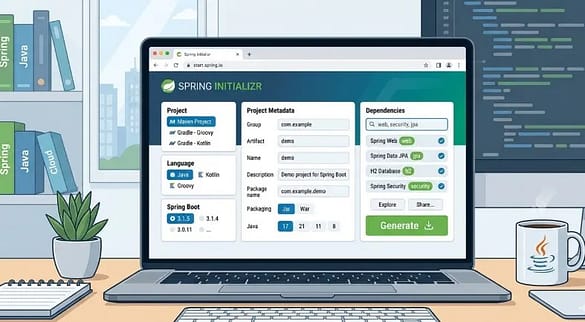
Let’s go through each option so you understand what to choose.
Step 1: Choose Project Type (Maven vs Gradle)
You will see two options:
- Maven Project
- Gradle Project
Both are build tools used to manage dependencies and build applications.
Which Should Freshers Pick in 2026?
Choose Maven if you are a beginner.
Why?
- Easier to understand
- More tutorials available
- Widely used in companies
- Better for freshers and students
Gradle is faster but slightly complex.
So Maven is the safest choice.
Step 2: Choose Language (Java, Kotlin, Groovy)
Options available:
- Java
- Kotlin
- Groovy
Choose Java.
Reason:
- Most companies use Java
- Large community support
- Easier learning curve
- Better job opportunities
Kotlin is growing, but Java is still dominant.
Step 3: Select Spring Boot Version
You will see multiple versions, like
- 3.2.x
- 3.3.x
- 3.4.x
Should You Pick the Latest Version?
Yes, always choose the latest stable version.
Avoid:
- Snapshot versions
- Milestone versions
Why?
Stable versions are tested and production-ready.
They reduce bugs and compatibility issues.
Step 4: Fill Project Metadata (Group, Artifact, Name, Package)
You need to fill:
- Group
- Artifact
- Name
- Package
Example:
Group: com.example
Artifact: demo
Name: demo
Package: com.example.demo
What Group and Artifact Actually Mean
A group represents your company or organization.
Example:
com.companyname
“Artifact” represents the project name.
Example:
student-management
Final package becomes:
com.companyname.studentmanagement
This is the standard structure used in real-world projects.
Step 5: Choose Packaging (JAR vs WAR)
Two options:
- JAR
- WAR
Choose JAR.
Why?
- Easy to run
- Embedded server
- Lightweight
- No external server needed
WAR is used in older enterprise systems.
Modern Spring Boot apps use JAR.
Step 6: Select Java Version
Choose:
Java 17 or Java 21
Recommended: Java 17
Why?
- LTS version
- Stable
- Supported by Spring Boot
- Used in companies
Step 7: Add Dependencies
Dependencies add features to your project.
Click Add Dependencies and select required ones.
5 Essential Dependencies for Your First Project
Start with these:
- Spring Web: Used to build REST APIs and web applications
- Spring Boot DevTools: Auto restart and faster development
- Spring Data JPA: Database interaction
- MySQL Driver: Database connection
- Lombok: Reduces boilerplate code
These are enough for a beginner project.
If you are confused between Spring and Spring Boot, read Spring vs Spring Boot: 7 Key Differences You Must Know.
Generate and Download the Project
Click Generate.
A ZIP file will download.
Extract it.
Now your project is ready.
Download Spring Boot Setup Checklist (PDF): spring_boot_setup_checklist
What is inside the ZIP file?
You will see:
- src folder
- pom.xml
- application.properties
- main class
- test folder
This is your Spring Boot project structure.
Folder Structure Explained
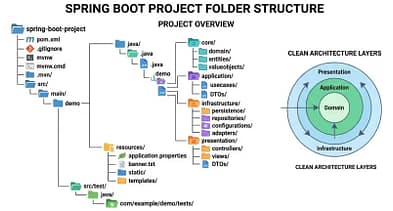
- src/main/java: Contains Java code
- src/main/resources: Contains configuration files
- pom.xml: Contains dependencies
- application.properties: Contains project settings
- main class: Starting point of application
This structure is standard in every Spring Boot project.
Import Into Your IDE
Now open the project in your IDE.
Importing Into IntelliJ IDEA
Steps:
- File → Open
- Select project folder
- Open as Maven project
- Wait for dependencies to download
- Done.
Importing Into Eclipse
Steps:
- File → Import
- Maven → Existing Maven Project
- Select folder
- Finish
The project will load.
Importing Into VS Code
Steps:
- Open folder
- Install Java Extension Pack
- Install Spring Boot Extension
- Run the project.
Simple and fast.
Run Your First Spring Boot App
Open the main class.
Click Run.
Or use the command- mvn spring-boot:run
Application starts.
You will see:
Started DemoApplication
The server is running on port 8080.
What the Console Output Means
Tomcat started on port 8080 means the following:
Your application is running successfully.
Open browser: localhost:8080
The project is live.
You just created your first Spring Boot app.
Common Errors on First Run and How to Fix Them
“Port 8080 Already in Use” Error
Cause:
Another app using port 8080.
Fix:
Change the port in the application.properties-server.port=8081
Restart application.
Problem solved.
Dependency Not Resolving Error
Cause: Internet or Maven issue.
- Fix: Reload Maven project
or
- Run: mvn clean install
Dependencies will download.
Maven vs Gradle Comparison Table
| Feature | Maven | Gradle |
|---|---|---|
| Build Tool Type | XML-based build tool | Groovy/Kotlin-based build tool |
| Configuration | Uses pom.xml file | Uses build.gradle or build.gradle.kts |
| Learning Curve | Easy for beginners | Slightly complex for beginners |
| Build Speed | Slower compared to Gradle | Faster due to incremental builds |
| Flexibility | Less flexible | Highly flexible and customizable |
| Dependency Management | Simple and structured | Advanced and dynamic |
| Performance | Stable but slower | Faster and optimized |
| Community Support | Very large and mature | Growing and modern |
| Industry Usage | Widely used in enterprise companies | Popular in modern and large-scale projects |
| IDE Support | Excellent support in IntelliJ, Eclipse, VS Code | Excellent support in IntelliJ and VS Code |
| Recommended For | Beginners and freshers | Experienced developers and large projects |
| Spring Boot Support | Fully supported | Fully supported |
Build tools like Maven are commonly used in modern Java development, which you can explore in the Java Roadmap for Freshers 2026 and practice through Java Projects for Freshers.
What to Learn After This
- Spring Boot REST API
- Spring Boot Controller
- Spring Boot Database Connection
- Spring Boot CRUD Project
- Spring Boot Microservices
Frequently Asked Questions (FAQs)
1. What is Spring Boot Initializr used for?
Spring Boot Initializr is an official tool used to generate ready-to-use Spring Boot project structures with selected dependencies and configurations. It helps developers avoid manual project setup by automatically creating build files, project metadata, and folder structure. The tool supports Maven and Gradle and allows developers to select Java version, packaging type, and dependencies. It is maintained by the Spring team and is widely used in professional development environments.
Source: Spring Official Documentation
Source: Spring Initializr
2. Can Spring Initializr be used offline?
Spring Initializr itself is a web-based tool and requires internet access to generate the project. However, after downloading the generated project, you can work on it offline in your IDE. The internet is only required when downloading dependencies through Maven or Gradle for the first time. Some IDEs like IntelliJ IDEA and VS Code provide built-in Initializr integration, but they still require internet for dependency resolution.
Source: Spring Initializr Documentation
Source: Maven Official Guide
3. Which Java version should be used with Spring Boot Initializr?
Spring Boot officially supports specific Java versions depending on the release. For Spring Boot 3.x, Java 17 or higher is required, and Java 21 is also supported as a long-term support (LTS) version. Using supported LTS versions ensures stability, compatibility, and long-term updates. Developers should always check the Spring Boot compatibility matrix before selecting a Java version.
Source: Spring Boot System Requirements
Source: Oracle Java LTS Information
4. Is Maven better than Gradle for beginners in Spring Boot projects?
Maven is generally considered easier for beginners because it uses a simple XML-based configuration and has extensive documentation and tutorials. Gradle offers faster build performance and flexible scripting but requires understanding of Groovy or Kotlin DSL. Spring Boot supports both build tools equally, and the choice depends on project needs and team preference. For learning and small projects, Maven is commonly recommended due to its straightforward structure.
Source: Spring Boot Build Systems
Source: Gradle vs Maven Comparison
5. Is Spring Boot Initializr safe and officially maintained?
Yes, Spring Boot Initializr is officially maintained by the Spring team and hosted on the Spring infrastructure. The generated project includes verified dependencies from Maven Central and trusted repositories. Since it is part of the official Spring ecosystem, it follows standard security and dependency management practices. Developers should still keep dependencies updated and follow secure coding practices for production applications.
Source: Spring Initializr GitHub Repository
Source: Spring Security and Dependency Management
Key Takeaways
- Spring Boot Initializr creates projects in minutes
- Maven and Java are best for beginners
- Always choose latest stable Spring Boot version
- JAR packaging is recommended
- Add essential dependencies first
- Import project into IDE and run easily
This is the fastest way to start Spring Boot development.
External Authority and References
Conclusion
Spring Boot Initializr makes project setup simple and fast.
Instead of struggling with configuration, you can focus on learning Spring Boot and creating spring boot project.
If you are a fresher or beginner, this tool should be your starting point for every Spring Boot project.
Start your first project now using Spring Initializr and run your Spring Boot application in under 5 minutes.
Discover more from GroWithMoney
Subscribe to get the latest posts sent to your email.