Most freshers don’t struggle with Spring Boot because of Java.
They struggle because of annotations.
You open a Spring Boot project and suddenly see @SpringBootApplication, @RestController, @Autowired, @Bean, @Configuration, and many more.
Everything looks simple, but understanding what each annotation actually does becomes confusing.
That’s why many developers memorize annotations instead of understanding them.
This guide is designed as a bookmark cheat sheet for spring boot annotations.
You’ll learn the 15 most important Spring Boot annotations, how they work, where to use them, and what interviewers expect you to explain.
Table of Contents
ToggleWhat Are Annotations in Spring Boot?
Annotations in Spring Boot are special markers that tell Spring how to configure and run your application automatically.
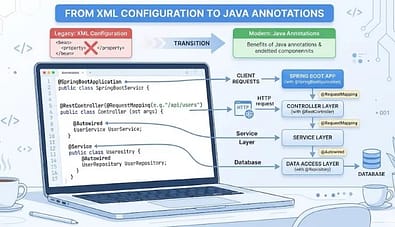
Instead of writing long XML configuration files, you use annotations directly in Java classes.
Spring Boot annotations are part of the core framework, so if you are new, you should first understand, “What is Spring Boot in Java?” A Beginner’s Complete Guide (2026) before moving deeper into annotations.
How Annotations Replace XML Configuration
Earlier spring projects used XML like this:
Now in Spring Boot:
@Service
public class StudentService {
}
Spring automatically detects and registers the class as a bean.
Simple Explanation
Think of annotations as instructions to Spring.
- @Service→ This class is a service
- @Repository→ This class handles database
- @RestController→ This class handles API
- @Autowired→ Inject dependency automatically
This is why the Spring annotations list for 2026 is shorter and cleaner than older Spring versions.
Category 1: Application Setup Annotations
These annotations start and configure the Spring Boot application.
1. @SpringBootApplication
This is the main annotation in Spring Boot.
@SpringBootApplication
public class DemoApplication { public static void main(String[] args) {
SpringApplication.run(DemoApplication.class, args);
}
}
What It Does Behind the Scenes
When Spring runs this class, it
- enables auto-configuration
- scans components
- starts Spring context
- runs embedded server
So one annotation handles everything.
The 3 Annotations It Combines
@SpringBootApplication is actually a combination of:
@Configuration
@EnableAutoConfiguration
@ComponentScan
This is why they are considered the most important Spring Boot annotations.
2. @EnableAutoConfiguration
This annotation tells Spring Boot:
Configure everything automatically based on dependencies.
Example:
If you add a MySQL dependency, Spring configures the following:
- DataSource
- Hibernate
- JPA
- Transaction manager
@EnableAutoConfiguration
public class AppConfig {
}
You don’t need manual setup.
Spring handles it.
3. @ComponentScan
This annotation tells Spring:
Scan packages and find components automatically.
Example:
@ComponentScan(“com.app”)
public class AppConfig {
}
Spring scans:
- controllers
- services
- repositories
- components
and registers them as beans.
Without this, Spring may not detect classes.
Category 2: Component & Stereotype Annotations
These define different layers of the application.
4. @Component
Basic annotation to register a class as a Spring bean.
@Component
public class EmailUtil { public void sendMail() {
System.out.println(“Mail sent”);
}
}
Spring manages this class automatically.
5. @Service
Used for business logic layer.
@Service
public class StudentService { public String getStudent() {
return “Student Data”;
}
}
It works like @Component but gives clear structure.
Interviewers like this answer.
6. @Repository
Used for database layer.
@Repository
public class StudentRepository { public void save() {
System.out.println(“Saved to DB”);
}
}
Extra benefit:
- handles database exceptions
- converts SQL exceptions to Spring exceptions
7. @Controller
Used in MVC applications.
@Controller
public class HomeController {@RequestMapping(“/home”)
public String home() {
return “home”;
}
}
Returns an HTML or JSP page.
8. @RestController
Used in REST APIs.
@RestController
public class StudentController {@GetMapping(“/student”)
public String getStudent() {
return “Student Data”;
}
}
Returns JSON or text.
@Controller vs @RestController
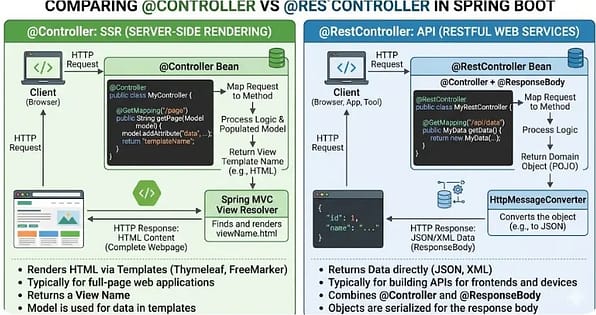
| Feature | @Controller | @RestController |
|---|---|---|
| Output | HTML/JSP | JSON/API |
| Use Case | Web app | REST API |
| ResponseBody | Needed | Not needed |
| Common Usage | MVC | Microservices |
This is one of the most common interview questions around @restcontroller annotation.
Category 3: Dependency Injection Annotations
These handle object creation and injection.
9. @Autowired
Automatically injects dependency.
@Service
public class StudentService {@Autowired
private StudentRepository studentRepository;
}
Spring creates and injects the object.
This concept is deeply covered in Day 7 → @Autowired in your learning series.
To understand this better, you can read What is Dependency Injection in Spring Boot? Simple 2026 Guide for Beginners, which explains how objects are injected automatically.
10. @Qualifier
Used when multiple beans exist.
@Autowired
@Qualifier(“studentRepository”)
private StudentRepository repository;
This tells Spring: Use this specific bean.
Without it, Spring throws an error.
11. @Primary
Defines default bean.
@Primary
@Component
public class MySQLDatabase implements Database {
}
No need for a qualifier.
Category 4: REST & Web Annotations
These control APIs and endpoints.
12. @RequestMapping
Maps URL to method.
@RequestMapping(“/api”)
public class StudentController {
}
Used at class or method level.
13. @GetMapping, @PostMapping, @PutMapping, @DeleteMapping
Used for HTTP methods.
@GetMapping(“/students”)
public List<Student> getStudents() {
return studentService.getAll();
}
@PostMapping(“/students”)
public String saveStudent() {
return “Saved”;
}
These are cleaner than @RequestMapping.
14. @RequestBody and @ResponseBody
Used to handle JSON.
@PostMapping(“/student”)
public String save(@RequestBody Student student) {
return “Saved”;
}
@ResponseBody
public String test() {
return “Hello”;
}
Used in APIs.
Category 5: Configuration & Bean Annotations
These manage custom configuration.
15. @Configuration and @Bean
Used to create manual Beans.
@Configuration
public class AppConfig {@Bean
public StudentService studentService() {
return new StudentService();
}
}
Spring registers this bean.
This concept is explained deeply in Day 8 → @Configuration.
Also used with Day 9, @Transactional is part of the advanced configuration.
If you want a deeper understanding, check What is Bean in Spring Boot? 4 Powerful Ways IoC Container Creates Beans to see how beans are created and managed.
Quick Reference Table
| Annotation | Purpose | Where Used |
|---|---|---|
| @SpringBootApplication | Start application | Main class |
| @EnableAutoConfiguration | Auto config | Setup |
| @ComponentScan | Scan packages | Setup |
| @Component | General bean | Utility |
| @Service | Business logic | Service layer |
| @Repository | Database | DAO layer |
| @Controller | MVC | Web app |
| @RestController | REST API | API layer |
| @Autowired | Inject dependency | Service/Controller |
| @Qualifier | Select bean | DI |
| @Primary | Default bean | DI |
| @RequestMapping | URL mapping | Controller |
| @Get/Post/Put/DeleteMapping | HTTP methods | API |
| @RequestBody | JSON input | API |
| @Configuration + @Bean | Manual bean | Config |
5 Annotation Mistakes Freshers Make Most Often
1. Wrong Use of @Autowired
Many freshers use field injection everywhere.
Better approach:
@Autowired
public StudentService(StudentRepository repo) {
this.repo = repo;
}
Constructor injection is preferred.
2. Confusing @Controller vs @RestController
Mistake:
Using @Controller for APIs.
Result:
- returns HTML
- API fails
Solution:
Use @RestController.
3. Missing @ComponentScan
If packages are outside the main class, Spring won’t detect beans.
Fix: @ComponentScan(“com.project”)
4. Multiple Beans Without @Qualifier
Spring throws: NoUniqueBeanDefinitionException
Fix: Use @Qualifier.
5. Creating Beans Without @Configuration
Mistake:
@Bean
public Service test() {
}
Without @Configuration, it won’t work.
My Experience Using Spring Boot Annotations
When I first started working with Spring Boot annotations, I honestly tried to memorize everything. I had a notebook full of @RestController, @Autowired, @Bean, and many others, but during coding or interviews, my mind would go blank. The real understanding came only after building small projects like a student management API and a simple login system.
One thing I learned quickly was that annotations make life easy, but only if you understand why they exist. For example, I once spent two hours debugging an API that wasn’t returning JSON, only to realize I had used @Controller instead of @RestController. That mistake stayed in my memory forever.
Over time, I stopped memorizing and started grouping annotations by purpose. That simple shift made development faster, cleaner, and far less stressful—especially before interviews or project deadlines.
Frequently Asked Questions (FAQ)
1. What is the most important annotation in Spring Boot?
The most important annotation in Spring Boot is @SpringBootApplication because it enables auto-configuration, component scanning, and configuration in a single annotation. It acts as the main entry point of a Spring Boot application and is typically placed on the main class. Without this annotation (or its equivalent combination of annotations), the Spring Boot application will not start properly. It simplifies project setup by reducing the need for manual configuration.
Source: Spring Official Documentation
2. What is the difference between @Controller and @RestController?
@Controller is used to create web applications that return HTML views such as JSP or Thymeleaf pages, while @RestController is used to build REST APIs that return JSON or text responses. The @RestController annotation combines @Controller and @ResponseBody, which means all methods automatically return data instead of views. This makes @RestController more suitable for microservices and API-based applications. The choice depends on whether the application serves web pages or APIs.
Source: Spring Framework Documentation
3. Is @Autowired required in Spring Boot for dependency injection?
@Autowired is commonly used for dependency injection, but it is not always required in modern Spring Boot. Since Spring Framework 4.3, constructor-based dependency injection works automatically if there is only one constructor in the class. This means developers can omit @Autowired in many cases and still achieve dependency injection. However, it is still used in field or setter injection when multiple constructors exist.
Source: Spring Framework Documentation
4. Can we create custom annotations in Spring Boot?
Yes, developers can create custom annotations in Spring Boot using Java annotation interfaces. These custom annotations are often used with Aspect-Oriented Programming (AOP), validation, logging, or security features. Spring allows custom annotations to be processed at runtime using reflection and configuration mechanisms. However, proper configuration is required to make them functional within the Spring context.
Source: Spring Framework Documentation
5. What is the role of @Configuration and @Bean in Spring Boot?
@Configuration is used to define configuration classes, and @Bean is used to create and register objects manually in the Spring container. These annotations are helpful when automatic component scanning is not suitable or when developers need full control over bean creation. The @Bean method returns an object that Spring manages as a bean within the application context. This approach is commonly used for third-party libraries and custom configurations.
Source: Spring Framework Documentation
Conclusion
Spring Boot annotations are not hard if you understand their purpose.
Focus on core 15 annotations, and most real-world projects will become easier to read and build.
Bookmark this cheat sheet and revise before interviews.
You can create your first project using Spring Boot Initializr: Easy Guide to Set Up Your First Project in Under 5 Minutes and try these annotations practically.
Share this:
- Share on Facebook (Opens in new window) Facebook
- Share on X (Opens in new window) X
- Share on Threads (Opens in new window) Threads
- Share on LinkedIn (Opens in new window) LinkedIn
- Share on Nextdoor (Opens in new window) Nextdoor
- Share on Mastodon (Opens in new window) Mastodon
- Share on Bluesky (Opens in new window) Bluesky
- Share on WhatsApp (Opens in new window) WhatsApp
- Share on Pinterest (Opens in new window) Pinterest
- Share on Tumblr (Opens in new window) Tumblr
- Share on Telegram (Opens in new window) Telegram
Related
Discover more from GroWithMoney
Subscribe to get the latest posts sent to your email.