If you’ve ever searched “Which Minecraft version should I play?” welcome to the club.
This question has confused beginners, parents, creators, and even longtime players for years.
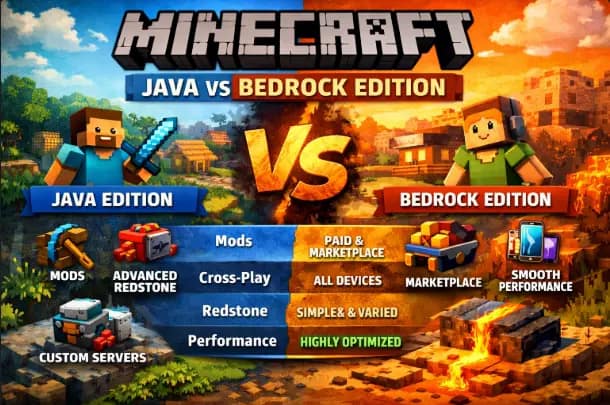
Minecraft Java Edition and Bedrock Edition look similar on the surface, but under the hood, they behave very differently. Those differences affect performance, mods, multiplayer, updates, redstone, and even how much freedom you get as a player.
This guide gives you a clean, honest, feature-by-feature breakdown—no hype, no bias, no unnecessary fluff.
Many players still feel confused when choosing between Minecraft Java vs Bedrock, especially when both versions look similar at first glance.
What Is Minecraft Java Edition?
Minecraft Java Edition is the original version of Minecraft, released in 2011 for Windows, macOS, and Linux.
It’s written in Java and has become the go-to choice for modders, technical players, and long-time PC gamers.
Java is famous for:
Massive modding support
Powerful redstone mechanics
Custom servers and community tools
What Is Minecraft Bedrock Edition?
Minecraft Bedrock Edition is the cross-platform version built on the Bedrock Engine.
It runs on:
Windows
Android
iOS
Xbox
PlayStation
Nintendo Switch
Bedrock focuses on performance, smooth gameplay, and cross-platform multiplayer.
Minecraft Java vs Bedrock Edition Comparison Table
Here’s the simple and clear comparison table most users are looking for.
| Feature | Java Edition | Bedrock Edition |
|---|---|---|
| Platforms | Windows, macOS, Linux | Windows, Mobile, Console |
| Performance | Moderate, system-dependent | Highly optimized |
| Cross-Platform Play | No | Yes |
| Mods | Free, community-made | Paid (Marketplace) |
| Marketplace | No | Yes |
| Redstone Behavior | Complex & consistent | Simplified & inconsistent |
| Combat System | Old combat (1.9+) | Faster, simpler |
| Multiplayer Servers | Fully customizable | Limited |
| Hardcore Mode | Yes | No |
| Official Updates | Same features, different timing | Same features, different timing |
Gameplay Differences That Matter
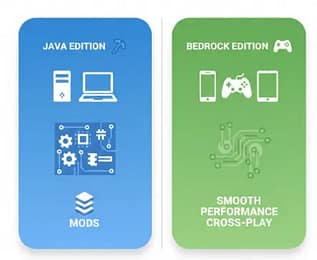
On the surface, both editions feel similar.
But once you play for a while, the differences become obvious.
Java Edition Gameplay
Redstone behaves predictably
Technical farms work consistently
Combat feels slower but more strategic
Commands and datapacks offer deep control
Bedrock Edition Gameplay
Smoother movement on low-end devices
Faster combat mechanics
Some redstone behaviors vary by platform
Better controller support
If you love precision, Java wins.
If you love smooth gameplay, Bedrock shines.
These gameplay mechanics highlight the key differences between Java and Bedrock that many players notice only after long-term play.
Updates: Are They the Same?
Yes—and no.
Both editions receive the same major updates:
New mobs
New biomes
New blocks
Core gameplay features
However:
Java updates are released first for testing (snapshots).
Bedrock uses betas & previews.
Bugs are fixed differently due to separate engines
Official source:
Minecraft Updates – https://www.minecraft.net
Mods vs Marketplace: Freedom vs Convenience
This is where the biggest difference lies.
Java Edition Mods (Free & Powerful)
Java supports:
Forge
Fabric
Quilt
Datapacks
Custom launchers
You can install:
Performance mods (Sodium, OptiFine)
New dimensions
Automation systems
Total game overhauls
All free, community-driven, and customizable.
Official reference:
https://www.minecraft.net/en-us/mods
Bedrock Marketplace (Paid & Controlled)
Bedrock uses the Minecraft Marketplace, where you can buy:
Skins
Texture packs
Worlds
Add-ons
Pros:
Easy to install
Safe for kids
Works across devices
Cons:
Most content is paid
Limited customization
No deep modding
Marketplace source:
https://www.minecraft.net/marketplace
Multiplayer: Friends vs Freedom
Java Multiplayer
Custom servers
Plugins
Mods
LAN play
No console/mobile cross-play
Perfect for:
SMP servers
Mini-games
Technical communities
Bedrock Multiplayer
Play with friends on any device
Xbox, PlayStation, mobile, PC together
Realms work smoothly
Limitations:
Server customization is restricted
Mods don’t work on public servers
Redstone: A Huge Deal for Advanced Players
Redstone behaves very differently between editions.
Java Redstone
Quasi-connectivity exists
Tick-perfect timing
Farms behave consistently
Ideal for technical builds
Bedrock Redstone
No quasi-connectivity
Random update order
Some farms break unexpectedly
Trusted source:
Minecraft Wiki – Redstone Mechanics
https://minecraft.wiki
Performance & System Requirements
Java Edition
It depends heavily on the CPU.
Needs optimization mods for smooth gameplay
It works best on mid- to high-end PCs
Bedrock Edition
Extremely optimized
Runs smoothly on low-end phones
Stable FPS across devices
If performance matters more than customization, Bedrock is safer.
Combat Differences Explained Simply

Java Combat
Introduced cooldown system
Rewards timing and strategy
Preferred by PvP purists
Bedrock Combat
Faster hits
Mobile-friendly
Easier for casual players
Neither is “better”—just different play styles.
Parental Controls & Safety
Bedrock includes:
Microsoft account integration
Parental controls
Marketplace moderation
Java relies more on:
Community servers
Third-party moderation tools
For younger players, Bedrock offers better built-in safety.
Which edition should you choose?
Here’s the honest verdict—no bias.
Choose Java Edition if:
You love mods and customization
You enjoy technical gameplay
You play on PC only
You want full control
Choose Bedrock Edition if:
You play with friends on different devices
You want smooth performance
You prefer simple setup
You play on mobile or console
Both are official Minecraft, both receive updates, and both are fun—just designed for different audiences.
Final Verdict
There is no universal “best” version of Minecraft.
Java Edition: Freedom & depth
Bedrock Edition = Accessibility & performance
Your choice should match how you play, not what others recommend.
Once you understand these differences, the confusion disappears—and the game becomes far more enjoyable.
Trusted Sources & References
Minecraft Official Website
https://www.minecraft.netMinecraft Java Documentation
https://help.minecraft.netMinecraft Bedrock Documentation
https://learn.microsoft.com/minecraftMinecraft Wiki
https://minecraft.wiki
Discover more from GroWithMoney
Subscribe to get the latest posts sent to your email.