Choosing between minecraft java vs bedrock edition can feel confusing at first. Both versions look similar. Both let you build, survive, and explore.
But under the surface, they work differently.
If you’re buying Minecraft for the first time, this guide will help you understand where to buy it, how pricing works, what you actually get, and the common mistakes beginners make. No hype. Just facts.
If you want a detailed breakdown, read our complete guide on minecraft java vs bedrock differences.
What Is the Difference Between Minecraft Java vs Bedrock Edition?
Minecraft has two main editions:
Java Edition
Bedrock Edition
Both are developed by Mojang Studios and owned by Microsoft.
However, they are built on different codebases.
Java Edition runs on the Java programming language and is available only on Windows, macOS, and Linux.
Bedrock Edition runs on a C++ engine and supports cross-platform play across consoles, mobile, and Windows.
They share core gameplay. But they differ in performance, modding, multiplayer compatibility, and technical features.
Where to Buy Minecraft
You should always buy Minecraft from official sources to avoid scams or invalid keys.
1. Buy from the Official Minecraft Website
The safest place is the official website:
https://www.minecraft.net
Here, you’ll see “Minecraft: Java & Bedrock Edition for PC.”
Since 2022, Microsoft bundles both editions together for PC users under one purchase. That means if you buy for a Windows PC, you get both Java and Bedrock in a single package.
This bundle is officially confirmed on the Minecraft website and Microsoft Store documentation.
2. Buy via Microsoft Store (Windows Users)
You can also purchase directly through the Microsoft Store app on Windows 10/11.
This links your game to your Microsoft account automatically, which simplifies updates and multiplayer access.
Confused between editions on Windows? See our comparison of minecraft java vs bedrock vs windows edition.
Pricing: How Much Does Minecraft Cost?
Pricing may vary slightly by region, but here’s the standard structure:
PC Bundle (Java + Bedrock)—One-time purchase
Console versions—sold separately for each platform
Mobile (Bedrock only) – Lower price than PC
According to the official Minecraft website, PC players now receive both editions in one purchase. There is no separate pricing for Java vs Bedrock on PC anymore.
Important note:
There is no subscription required to play single-player Minecraft. However, online multiplayer servers may have optional costs depending on hosting.
What You Get with Each Edition
Let’s break this down clearly.
Minecraft Java Edition – What You Get
Java Edition is known for flexibility and customization.
Key Features:
Massive modding community
Custom servers with unique game modes
Access to snapshots (early experimental updates)
Advanced Redstone mechanics
Java allows deep customization through mods and shaders. Many popular multiplayer servers originally started on Java.
It does not support cross-play with consoles or mobile.
Minecraft Bedrock Edition—What You Get
Bedrock focuses on performance and accessibility.
Key Features:
Cross-play between Xbox, PlayStation, Switch, mobile, and Windows
Marketplace for skins, worlds, and add-ons
Better performance on lower-end systems
Parity updates across devices
Bedrock supports Realms, which are official subscription-based private servers hosted by Mojang.
If your goal is playing with friends on different devices, Bedrock is the better option.
Performance Comparison: Which Runs Better?
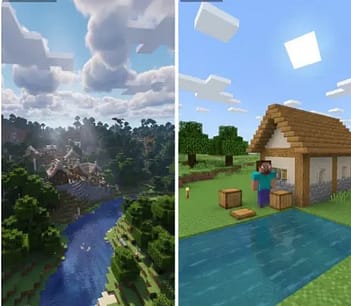
This depends on your system.
Java Edition can struggle on low-end PCs without optimization mods.
Bedrock Edition generally runs smoother because it uses C++ instead of Java.
Many benchmarks and community reports confirm Bedrock performs better on weaker hardware. However, high-end PCs run both smoothly.
For deeper benchmarks and FPS comparison, check out our full minecraft java vs bedrock performance comparison.
Multiplayer Differences Explained Simply
This is where many beginners get confused.
Java Multiplayer
Requires Java-compatible servers
Does not support console or mobile cross-play
Massive third-party server ecosystem
Popular Java servers use custom plugins and mods that don’t work on Bedrock.
Bedrock Multiplayer
Cross-platform support
Microsoft account required
Easier friend joining system
If your friend plays on Xbox or mobile, you must choose Bedrock.
Modding: A Major Deciding Factor
Java dominates in modding.
The Java community offers thousands of free mods via platforms like CurseForge. These mods can completely transform gameplay.
Bedrock supports add-ons, but they are more limited compared to Java mods.
If you want heavy customization, advanced automation, or total gameplay overhaul—Java wins.
Graphics & Shaders
Both editions support custom skins and textures.
However:
Java supports advanced shader packs like SEUS or BSL.
Bedrock offers RTX ray tracing support on compatible hardware (Windows 10 with RTX GPU).
Ray tracing in Bedrock is officially documented by Microsoft and NVIDIA partnerships.
Redstone & Technical Gameplay
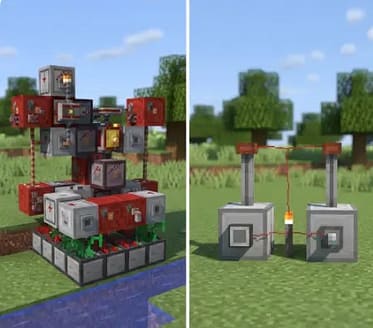
Technical players often prefer Java because:
Redstone mechanics behave slightly differently
Certain farms and automation systems work more reliably
Java receives experimental snapshots first
However, Mojang continues working toward parity between editions.
If automation and farms matter to you, read our guide on minecraft java vs bedrock redstone mechanics.
Updates & Version Parity
Mojang aims to release updates simultaneously across both editions.
Major updates like the Wild Update and Trails & Tales launched on both versions together.
Still, small mechanics may behave differently.
Always check official patch notes on minecraft.net for accurate details.
Account Requirements
Java Edition now requires a Microsoft account login.
Bedrock always required a Microsoft account for multiplayer.
Mojang officially completed the migration from Mojang accounts to Microsoft accounts in 2023.
Common Mistakes Beginners Make
Let’s prevent expensive regrets.
Mistake 1: Buying the Wrong Platform
Buying Bedrock on console does not give you Java on PC.
Each platform purchase is separate unless you buy the PC bundle.
Mistake 2: Ignoring Cross-Play Needs
If your friends use consoles, don’t buy Java expecting to join them.
Java cannot cross-play with Xbox, PlayStation, or mobile.
Mistake 3: Assuming Mods Work Everywhere
Java mods do not work on Bedrock.
Marketplace add-ons are different from Java mods.
Mistake 4: Buying from Unofficial Sellers
Third-party key sites often sell invalid or region-locked codes.
Stick to:
Official Minecraft website
Microsoft Store
Recognized console stores
Who Should Choose Java Edition?
Choose Java if:
You play only on PC
You love mods and customization
You enjoy technical builds
You want access to experimental snapshots
Java remains the preferred choice for advanced players and content creators.
Who Should Choose Bedrock Edition?
Choose Bedrock if:
You want cross-platform multiplayer
Do you play on console or mobile
You prefer smoother performance
You want simple multiplayer setup
Bedrock is ideal for casual players and friend groups across devices.
Which Edition Should You Choose Based on Your Situation?
Different players have different needs. Here are some realistic scenarios to help you decide more clearly.
If You’re a College Student with a Low-End PC
If your computer has limited RAM or integrated graphics, performance matters more than advanced customization. Bedrock Edition generally runs more efficiently because it uses a C++ engine rather than Java. Many users report smoother gameplay on lower-end systems with Bedrock.
If your priority is stable FPS without installing optimization mods, Bedrock may be the safer choice.
If You Want to Create YouTube Modded Content
If you plan to create modded gameplay videos, custom maps, or advanced automation builds, Java Edition offers significantly more flexibility. The Java community supports extensive third-party mods through platforms like CurseForge.
Java also allows access to snapshots and experimental builds earlier than Bedrock. For content creators who want full customization, Java is usually preferred.
If You Play with Family on Different Devices
If your friends or family play on Xbox, PlayStation, Nintendo Switch, or mobile devices, cross-play becomes essential. Bedrock Edition supports cross-platform multiplayer using Microsoft accounts.
Java Edition does not support console or mobile cross-play. If shared multiplayer across devices is your priority, Bedrock is the practical choice.
Frequently Asked Questions (FAQ)
1. Can Minecraft Java and Bedrock play together?
No, Minecraft Java Edition and Bedrock Edition cannot natively play together. They are built on different codebases and use different networking systems. However, third-party server software such as GeyserMC can bridge compatibility, but this is not officially supported by Mojang Studios.
As of 2026, there is no official confirmation from Mojang Studios that full native cross-play between Java and Bedrock is planned.
Source: Minecraft Official Support
2. Do I get both Java and Bedrock if I buy Minecraft on PC?
Yes. Since June 2022, purchasing Minecraft for PC includes both Java Edition and Bedrock Edition in one bundle. This applies to users who buy through the official Minecraft website or Microsoft Store for Windows.
This change was officially announced by Mojang Studios and Microsoft.
Source: Minecraft.net
3. Is Minecraft Java Edition being discontinued?
No. Mojang Studios has not announced any plans to discontinue Java Edition. Both Java and Bedrock continue to receive major updates simultaneously.
However, Mojang aims for feature parity between editions, meaning gameplay mechanics are gradually aligned.
As of 2026, there is no official confirmation from Mojang that Java Edition will be discontinued.
Source: Minecraft Official Website
4. Which edition supports mods?
Minecraft Java Edition supports extensive modding through community-created modifications. These mods are typically installed via third-party platforms like CurseForge.
Bedrock Edition supports add-ons and Marketplace content, but these are more limited compared to Java mods. Official Minecraft documentation confirms that Java has broader modding capabilities.
Source: Minecraft Help Center
5. Does Bedrock perform better than Java?
Bedrock Edition generally runs more efficiently because it is written in C++. Java Edition runs on the Java programming language, which can require more system resources.
However, performance depends on hardware specifications, installed mods, and optimization settings. Mojang does not officially declare one edition as universally faster.
Source: Minecraft.net Technical Information
6. Can I transfer worlds between Java and Bedrock?
There is no built-in official tool from Mojang Studios that directly converts worlds between Java and Bedrock. However, third-party tools exist that allow conversion, but these are not officially supported.
World compatibility differs due to engine differences and game mechanics variations.
As of 2026, there is no official confirmation of native world transfer support.
Source: Minecraft Help Center
7. Do both editions receive the same updates?
Major content updates are released for both editions around the same time. Mojang has publicly committed to feature parity between Java and Bedrock.
However, small gameplay mechanics may still behave differently due to engine differences.
Source: Minecraft Official Blog
Final Recommendation: Which One Is Better?
There is no universal winner.
The best choice depends on how you play.
If you’re on a Windows PC, the decision is easier—you now receive both editions in one purchase. You can test both and decide which suits you.
If you’re buying for console or mobile, you are automatically getting Bedrock.
So instead of asking, “Which is better?” ask:
Where do I play?
Who do I play with?
Do I care about mods?
Answer those three questions, and your choice becomes obvious.
Still unsure which one suits you? We explain it clearly in our guide on minecraft java vs bedrock which is better.
Trusted Sources & References
To ensure accuracy and transparency, here are official sources:
Mojang Studios Documentation
Microsoft Store – Minecraft Listing
Minecraft Help Center
All information in this guide aligns with publicly available documentation and official announcements.
Conclusion
Understanding minecraft java vs bedrock edition isn’t about picking a winner. It’s about picking the right fit.
Java gives you power and flexibility.
Bedrock gives you accessibility and cross-play.
Both offer the same core Minecraft experience—creativity, survival, and exploration in an open sandbox world.
Buy from official sources, understand your platform needs, and avoid the common mistakes.
Once you start building your first house at sunset, the edition won’t matter nearly as much as the adventure ahead.
Which edition are you planning to buy — Java or Bedrock?
Tell us your device and we’ll suggest the best one for you.
Discover more from growithmoney
Subscribe to get the latest posts sent to your email.