If you’ve played Minecraft Java Edition for a while, you’ve probably heard people talk about mods.
Some players use them to improve performance. Others install massive content packs that add new dimensions, mobs, and machines. And a few go so far that the game barely looks like Minecraft anymore.
But what exactly are Minecraft Java mods? How do they work? And how can you use them safely without breaking your game?
Let’s break it down in a clear, practical way.
If you’re new to the Java version, read our complete Minecraft Java Edition guide before installing mods.
What Are Minecraft Java Mods?
Minecraft Java mods are custom modifications created by the community that change how the game works.
They can:
Add new items, blocks, mobs, and dimensions
Improve graphics or performance
Introduce automation, machines, and tech systems
Overhaul combat, world generation, or progression
Unlike the Bedrock Edition, the Java Edition allows deeper code-level customization. That flexibility is why the modding community around Java is so strong.
Minecraft Java Edition runs on Java and supports external modifications through mod loaders and community-developed APIs. This system makes modding possible.
You can find official documentation about Minecraft Java Edition on the Minecraft website:
https://www.minecraft.net
What Mods Actually Do (With Real Examples)
Mods vary widely. Some are tiny quality-of-life tweaks. Others are full game expansions.
Here are the main categories:
1. Quality-of-Life Mods
These improve convenience without changing the core gameplay.
Examples:
Inventory sorting tools
Mini-map overlays
Better crafting interfaces
They make survival smoother but keep the vanilla feel intact.
2. Performance Optimization Mods
Many players install mods just to improve FPS and stability.
For example, OptiFine improves performance and adds graphics options like shaders, dynamic lighting, and HD texture support.
Official site: https://optifine.net
Another popular performance mod is Sodium, which focuses purely on rendering optimization for modern systems.
Project page: https://modrinth.com/mod/sodium
If your PC struggles with default settings, performance mods often help more than lowering resolution alone.
3. Content Expansion Mods
These mods add entirely new gameplay systems.
Examples include:
New biomes and dimensions
Advanced machinery and automation
Magic systems
RPG-style progression
Some modpacks combine dozens (or hundreds) of mods to create a completely new experience.
This is why modded Minecraft sometimes feels like a different game.
4. Technical & Automation Mods
These are popular among advanced players.
They add:
Power systems
Industrial machines
Item transport networks
Digital storage systems
Players who enjoy logic, automation, and engineering often spend hundreds of hours in tech-focused modpacks.
How Mods Work Behind the Scenes
Mods don’t replace Minecraft entirely.
Instead, they hook into the game using mod loaders. These loaders provide a framework that allows custom code to interact with the game safely.
Without a mod loader, Minecraft won’t recognize mod files.
That’s why installing the correct loader version is critical.
Popular Mod Loaders for Minecraft Java
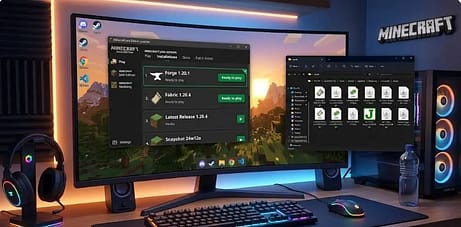
Mod loaders act as bridges between the game and community-created content. They manage compatibility and allow multiple mods to work together.
Here are the most widely used ones.
1. Forge
Minecraft Forge is the most established mod loader.
It has existed for many years and supports a massive library of mods.
Why players use Forge:
Broad compatibility
Large mod ecosystem
Strong documentation
Stable releases
Official site: https://files.minecraftforge.net
Most large modpacks historically rely on Forge.
If you want maximum compatibility, Forge remains a safe choice.
2. Fabric
Fabric is a lightweight alternative to Forge.
It focuses on:
Faster updates for new Minecraft versions
Minimal overhead
Performance-focused mods
Official site: https://fabricmc.net
Many modern optimization mods (like Sodium) run on Fabric.
If you prefer performance and a lean setup, Fabric is often ideal.
3. Quilt
Quilt is a newer community-driven fork of Fabric.
It aims to:
Improve modularity
Enhance open governance
Maintain compatibility with Fabric mods
Official site: https://quiltmc.org
While smaller than Forge or Fabric, it’s growing steadily.
How to Install Minecraft Java Mods (Step-by-Step)
Here’s a safe, straightforward process.
Step 1: Check Your Minecraft Version
Mods are version-specific.
If your game runs 1.20.4, you must download mods built for 1.20. 4. Even small mismatches can cause crashes.
You can check your version in the Minecraft launcher.
Step 2: Install a Mod Loader
Download Forge or Fabric from their official websites only.
Run the installer and choose:
“Install Client”
The correct game version
Once installed, open the launcher and select the new modded profile.
Step 3: Locate the Mods Folder
After launching once with the mod loader:
Close the game
Open your Minecraft directory
Find or create the mods folder
On Windows, it’s usually:
Step 4: Download Mods from Trusted Sources
Use reputable platforms like the following:
Modrinth
CurseForge
Avoid random file-hosting sites.
Download the .jar file and place it inside the mods folder.
Step 5: Launch the Game
Start Minecraft using the modded profile.
If everything matches correctly, the mods will load automatically.
If it crashes, double-check:
Game version
Loader version
Mod compatibility
Most issues come from version mismatches.
Safety Tips for Installing Minecraft Java Mods
Modding is generally safe when done correctly. However, you should stay cautious.
Here’s how.
1. Use Official & Trusted Platforms Only
Stick to known sites:
These platforms scan uploads and reduce malware risk.
Avoid unofficial download mirrors.
2. Never Ignore Version Compatibility
Many crashes happen because players mix versions.
A 1.19 mod will not work properly on 1.20 unless explicitly stated.
Always check the version tag before downloading.
3. Install One Mod at a Time (If You’re New)
If you install 20 mods at once and the game crashes, debugging becomes difficult.
Add mods gradually. Test each one.
It saves hours of frustration.
Make sure you have the official version installed. Follow our step-by-step Minecraft Java download guide if you haven’t installed it yet.
4. Back Up Your Worlds
Before installing large mods or modpacks, copy your world folder.
You can find it inside:
If something breaks, you won’t lose your progress.
5. Understand Multiplayer Limitations
Servers must support the same mods.
If you join a vanilla server with client-side gameplay mods, it may disconnect you.
Always check server requirements.
Before joining modded multiplayer, read our complete Minecraft Java servers guide to understand compatibility rules.
6. Keep Java Updated
Minecraft Java runs on Java.
Outdated Java installations can cause the following:
Crashes
Security issues
Performance problems
Download updates from the official Oracle website or your system package manager.
Common Questions About Minecraft Java Mods
Are mods allowed by Mojang?
Mojang allows mods as long as they follow the Minecraft End User License Agreement.
You can review the EULA here:
https://www.minecraft.net/en-us/eula
Mods must not distribute the full game or violate licensing terms.
Can mods damage my computer?
If downloaded from trusted platforms, mods are generally safe.
Problems usually occur when players download files from unknown sources.
Treat mod files like any other downloadable software.
Do mods affect performance?
Some improve performance.
Others increase system load, especially large content expansions.
If your PC has:
8GB RAM → Use lightweight mods
16GB RAM → Most modpacks run smoothly
Allocate RAM carefully in the launcher settings.
Why Minecraft Java Mods Matter
Minecraft Java remains popular largely because of its modding ecosystem.
Mods:
Extend replayability
Encourage creativity
Build communities
Support learning (many players discover programming through modding)
Few games offer this level of customization.
The open nature of Java Edition makes experimentation possible without breaking the core experience.
Here’s a detailed breakdown of Minecraft Java vs Bedrock differences and why modding is possible only on Java.
Common Errors & Fixes
| Problem | Likely Cause | Fix |
|---|---|---|
| Game crashes on launch | Version mismatch | Match mod + loader version |
| Mods not showing | Wrong folder | Check .minecraft/mods |
| Server disconnect | Server not modded | Confirm server requirements |
Trusted Sources and References
To ensure accuracy and credibility, here are authoritative sources referenced or recommended for further reading:
Official Minecraft Documentation & Tools
My Experience Using Minecraft Java Mods
The first time I installed mods, I was overconfident. I downloaded several at once, skipped checking versions, and hit “Play” like nothing could go wrong. The game crashed instantly. That was my first lesson: modding rewards patience, not speed.
After that, I started small. I tested one mod at a time and launched the game after each install. It felt slower, but troubleshooting became easy. When something broke, I knew exactly why. That alone saved me hours.
I also learned the hard way to back up my world. I once added a large gameplay mod to an existing survival save. The terrain changed in strange ways, and some chunks didn’t load properly. Since then, I always copy my world folder before experimenting. It’s a simple habit, but it protects your progress.
Performance mods were a pleasant surprise. On an older system, smoother gameplay made everything feel fresh again. No dramatic tweaks—just steady, noticeable improvement.
If you’re new to mods, treat it like building with blocks. Add one piece, test it, then expand. It’s far more enjoyable when things work—and far less stressful when they don’t.
Frequently Asked Questions (FAQ)
1. Are Minecraft Java mods officially allowed?
Yes, modding is allowed within certain limits. Mojang’s End User License Agreement (EULA) permits players to create and use mods as long as they do not distribute the full game or violate licensing terms. Mods must not include copyrighted Minecraft assets in a way that replaces the need to purchase the game. Commercial use is restricted under Mojang’s guidelines. Always review the official EULA before creating or sharing mods.
Source: Minecraft (Official EULA)
2. Do Minecraft Java mods work on Bedrock Edition?
No, Java mods are not compatible with Bedrock Edition. Minecraft Java Edition and Bedrock Edition are built on different codebases and engines, which prevents cross-compatibility. Bedrock supports add-ons and marketplace content instead of Java-style mods. Mojang has not announced official support for Java mods on Bedrock as of 2026.
Source: Minecraft (Official Game Editions Information)
3. Can Minecraft mods cause security risks?
Mods can pose security risks if downloaded from unverified sources. Official platforms like CurseForge and Modrinth host moderated files to reduce malware risks, but users should still exercise caution. Mojang does not officially review third-party mods. There is no official confirmation from Mojang that all third-party mods are safe as of 2026.
Source: Minecraft Help Center
4. Why does Minecraft crash after installing mods?
Minecraft commonly crashes when mod versions do not match the game version or mod loader version. Forge and Fabric both require exact version compatibility. The official Forge documentation specifically warns users to install matching builds. Checking compatibility before installation reduces most crash issues.
Source: Minecraft Forge (Official Downloads & Documentation)
5. Do performance mods like OptiFine change gameplay mechanics?
OptiFine primarily focuses on graphical enhancements and performance optimization. According to the official OptiFine website, it adds advanced graphics settings, shader support, and FPS improvements. It does not change core survival mechanics or add new gameplay systems. It remains a client-side optimization tool.
Source: OptiFine (Official Website)
Final Thoughts
Minecraft Java mods transform the game in powerful ways.
You can keep things simple with quality-of-life improvements. Or you can turn Minecraft into a tech simulator, RPG, or performance-optimized sandbox.
The key is simple:
Use trusted platforms
Match versions correctly
Install a reliable mod loader
Back up your worlds
Modding doesn’t have to be complicated.
Start small. Test carefully. And once you’re comfortable, explore larger modpacks.
With the right setup, Minecraft Java mods can make your game smoother, deeper, and far more personal—without compromising stability or safety.
If you follow the guidelines above, you’ll avoid common mistakes and enjoy everything the modding community has built over the years.
Discover more from GroWithMoney
Subscribe to get the latest posts sent to your email.