
When I was talking to a 2025 CSE fresher preparing for Java developer roles, he told me something interesting.
“I built 4 Spring Boot projects, but every interviewer asked, ‘Where did you deploy them?'”
This is where most freshers get stuck.
They learn Java.
They build projects.
They even understand APIs and databases.
But they never deploy their applications on cloud platforms.
And in 2026, that is a big mistake.
Companies like TCS, Infosys, Accenture, and startups expect developers to understand cloud deployment basics, especially for Java applications.
That’s why choosing the best cloud platforms for Java apps is not just a technical decision — it directly impacts your job chances, project quality, and portfolio strength.
If you already understand what Java is and why it’s still popular, the next logical step is learning where Java apps actually run in real-world production.
Let’s break everything in a simple and practical way.
Why Cloud Matters for Java Developers in 2026
Earlier, developers used to run Java applications on local servers or company machines.
Now everything runs on the cloud.
Here’s what actually changed
Before
- Local server deployment
- Manual setup
- Limited scalability
- Hard to maintain
Now
- Cloud hosting
- Auto scaling
- Global access
- Easy deployment
- DevOps integration
This is why Java cloud hosting 2026 is becoming a mandatory skill.
In interviews, companies now ask
- Have you deployed a Spring Boot app on AWS or Azure?
- Do you know Docker or cloud hosting?
- Can you run a Java application in the cloud?
If your answer is yes, your profile immediately becomes stronger.
If you are following a structured Java developer roadmap for freshers, cloud deployment should come right after Spring Boot projects.
Types of Cloud Platforms (PaaS vs IaaS vs Serverless)
Before choosing a platform, you need to understand one simple concept.
1. IaaS (Infrastructure as a Service)
You control servers.
Examples:
- AWS EC2
- Azure Virtual Machines
- Google Compute Engine
You manage
- Server
- OS
- Java installation
- Database
- Deployment
Good for learning real-world infrastructure.
2. PaaS (Platform as a Service)
You only deploy your app.
Examples:
- Heroku
- AWS Elastic Beanstalk
- Google App Engine
Platform manages
- Server
- Runtime
- Scaling
- Deployment
Best for beginners.
3. Serverless
You deploy code without managing servers.
Examples:
- AWS Lambda
- Azure Functions
- Google Cloud Functions
Best for microservices and APIs.
Simple Understanding
| Type | Difficulty | Control | Best For |
|---|---|---|---|
| IaaS | Medium | High | Backend developers |
| PaaS | Easy | Medium | Freshers |
| Serverless | Medium | Low | Microservices |
Best Cloud Platforms for Java Apps in 2026
Here are the most practical and widely used platforms.
1. AWS (Amazon Web Services)
Why AWS is popular for Java developers
AWS is the most widely used cloud platform in the world.
Most startups and companies use AWS for backend deployment.
Key services for Java
- EC2 (Server hosting)
- Elastic Beanstalk (Java deployment)
- RDS (Database)
- S3 (Storage)
- Lambda (Serverless)
Pros
- Industry standard
- Huge documentation
- Free tier available
- Used in most companies
- Strong for Spring Boot
Cons
- Complex for beginners
- The dashboard is confusing at first
Best for
- Java backend developers
- Spring Boot projects
- Production-level applications
2. Microsoft Azure
Azure is growing very fast, especially in enterprise companies.
Many Indian service-based companies prefer Azure.
Key services
- Azure App Service
- Virtual Machines
- Azure SQL
- Azure DevOps
Pros
- Easy UI
- Good for enterprise
- Strong integration with Microsoft tools
- Beginner-friendly
Cons
- Slightly expensive
- Less beginner tutorials than AWS
Best for
- Enterprise Java developers
- Corporate job preparation
- Service-based company roles
AWS vs Azure for Java Developers
This is one of the most searched comparisons.
| Feature | AWS | Azure |
|---|---|---|
| Popularity | Very high | High |
| Beginner-friendly | Medium | Easy |
| Job demand | Very high | High |
| Learning curve | Hard | Moderate |
| Free tier | Good | Good |
| Enterprise use | High | Very high |
Simple decision
Choose AWS if:
- You want startup or product company jobs
- You want strong cloud skills
- You want industry-standard experience
Choose Azure if:
- You target TCS, Infosys, Wipro
- You want easier cloud learning
- You prefer Microsoft ecosystem
3. Google Cloud Platform (GCP)
GCP is powerful but slightly less used than AWS and Azure.
Still, many startups and tech companies use it.
Key services
- Compute Engine
- App Engine
- Cloud Run
- Cloud SQL
Pros
- Clean UI
- Fast performance
- Easy deployment
- Good for microservices
Cons
- Fewer Java tutorials
- Smaller job market
Best for
- Startup developers
- Cloud learning
- Microservices
4. Heroku
Heroku is one of the easiest platforms for beginners.
You can deploy a Spring Boot app in minutes.
Pros
- Very easy
- Git-based deployment
- Beginner-friendly
- No server management
Cons
- Limited free tier
- Not ideal for large production apps
Best for
- Freshers
- Portfolio projects
- Quick deployment
If you are learning what is Spring Boot in Java, Heroku is a great starting platform.
5. Oracle Cloud
Oracle Cloud is underrated but useful.
Pros
- Free tier available
- Good Java support
- Stable infrastructure
Cons
- Less documentation
- Smaller community
Best for
- Free cloud hosting
- Learning deployment
6. DigitalOcean
DigitalOcean is simple and developer friendly.
Pros
- Clean dashboard
- Easy setup
- Affordable
- Fast deployment
Cons
- Less enterprise usage
Best for
- Personal projects
- Backend deployment
- Learning cloud
Comparison Table of All Cloud Platforms
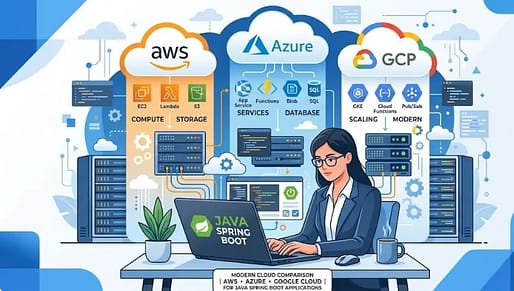
| Platform | Difficulty | Free Tier | Best For | Job Demand |
|---|---|---|---|---|
| AWS | Medium | Yes | Production apps | Very high |
| Azure | Easy | Yes | Enterprise | High |
| GCP | Medium | Yes | Startups | Medium |
| Heroku | Easy | Limited | Freshers | Medium |
| Oracle | Easy | Yes | Free hosting | Low |
| DigitalOcean | Easy | Limited | Personal projects | Medium |
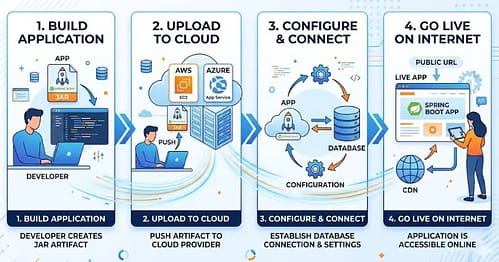
Step-by-Step: Deploy Java Spring Boot to Cloud
Here’s a simple deployment process that actually works.
Step 1: Build Spring Boot Project
Create a project with:
- Spring Boot
- REST API
- MySQL or PostgreSQL
- Maven
Export JAR file.
Step 2: Create Cloud Account
Choose:
- AWS
- Azure
- Heroku
- GCP
Sign up for the free tier.
Step 3: Upload Application
Options:
- Git deployment
- JAR upload
- Docker container
- App service deployment
Step 4: Configure Database
Add:
- Cloud SQL
- RDS
- PostgreSQL
Update application.properties.
Step 5: Run Application
Deploy and start the server.
Your Java app goes live.
Common Mistakes Freshers Make
1. Only running projects locally
Interviewers want live, deployed projects.
2. Not learning cloud basics
Cloud knowledge increases job chances.
3. Choosing complex platforms first
Start with Heroku or Azure.
Then move to AWS.
4. Ignoring deployment on resume
Always mention:
- Deployed Spring Boot app on AWS
- Hosted REST API on cloud
This improves your chances of how to get your first tech job significantly.
Which Cloud Platform Should You Choose in 2026
Here’s what actually works.
If you are a fresher
Start with: Heroku → Azure → AWS
If you want product company job
Choose: AWS
If you want service-based company
Choose: Azure
If you want easy deployment
Choose: DigitalOcean or Heroku
Best practical path
Step 1: Heroku
Step 2: Azure
Step 3: AWS
Step 4: GCP
This builds strong cloud knowledge.
Real Interview Perspective
In many interviews, candidates are asked the following:
Where is your project hosted?
If you say: “On AWS with Spring Boot and MySQL“
It creates a strong impression.
Because it shows:
- Practical knowledge
- Deployment experience
- Industry understanding
That’s what companies want in 2026.
Frequently Asked Questions (FAQ) Section
1. Which cloud platform is best for Java applications in 2026?
There is no single cloud platform that is officially considered the best for all Java applications. AWS, Azure, and Google Cloud are widely used because they provide dedicated tools and managed services for deploying Java and Spring Boot applications. AWS Elastic Beanstalk supports Java SE and Tomcat platforms for easy deployment and scaling, while Azure supports multiple Java frameworks and application servers. The right choice depends on project needs, learning goals, and company ecosystem.
Source: AWS Documentation
Source: Microsoft Learn
2. Can Java Spring Boot applications be deployed to the cloud easily?
Yes, Spring Boot applications are designed to run on cloud platforms with minimal configuration. Official Spring Boot documentation states that executable JAR files are ready for most cloud PaaS providers and can be deployed using buildpacks or standard deployment tools. Platforms like AWS Elastic Beanstalk and Heroku allow developers to deploy Java applications using simple commands or Git-based deployment. The process usually involves packaging the JAR file and uploading it to the cloud environment.
Source: Spring Boot Documentation
3. Is AWS free for Java developers?
AWS offers a free tier that allows developers to test and deploy small Java applications with limited resources. The free tier includes services like EC2, Elastic Beanstalk, and storage with usage limits for a specific period or monthly quota. However, costs apply once usage exceeds free limits, so monitoring usage is important. AWS does not guarantee free hosting for large or production applications.
Source: AWS Free Tier
4. Does Microsoft Azure support Java and Spring Boot officially?
Yes, Microsoft Azure officially supports Java, Spring Boot, and multiple Java application servers. Azure provides managed services such as virtual machines, containers, and platform-as-a-service solutions for deploying Java applications. Developers can run any Java version and use application servers like Tomcat, WebLogic, and JBoss on Azure infrastructure. Azure also offers specialized tools for Spring-based applications.
Source: Microsoft Learn
5. What is the easiest cloud platform for beginners to deploy Java apps?
Platform-as-a-Service (PaaS) platforms are generally considered easier for beginners because they handle server configuration and deployment processes. According to Spring Boot documentation, platforms like Heroku and Cloud Foundry use buildpacks that automatically configure the runtime and environment. This reduces manual setup and simplifies deployment for new developers. Ease of use depends on the developer’s familiarity with cloud tools and workflows.
Source: Spring Boot Documentation
6. Do companies require cloud knowledge for Java developer jobs?
Many companies expect Java developers to understand cloud deployment because modern applications run on cloud infrastructure. Official cloud documentation shows that platforms like AWS and Azure provide integrated tools for building, deploying, and managing Java applications in production environments. Cloud knowledge helps developers work with scalable and managed infrastructure, which is common in enterprise and startup environments. Requirements may vary depending on company and job role.
Source: Microsoft Learn
Source: AWS Documentation
7. Can Java applications run on multiple cloud platforms?
Yes, Java applications are platform-independent and can run on multiple cloud providers. Spring Boot documentation explains that executable JAR files contain everything needed to run the application, making them suitable for different cloud environments. Developers can deploy the same application on AWS, Azure, GCP, or other PaaS platforms with minor configuration changes. Compatibility depends on runtime environment and service configuration.
Source: Spring Boot Documentation
8. What are the common ways to deploy Java applications to the cloud?
Java applications are typically deployed using JAR files, WAR files, containers, or managed platform services. AWS Elastic Beanstalk allows deployment through CLI, console, or APIs, while Azure provides virtual machines, containers, and PaaS services for deployment. Developers can also use CI/CD pipelines and build tools like Maven or Gradle to automate deployment. The exact method depends on the cloud provider and project requirements.
Source: AWS Elastic Beanstalk Documentation
Source: Microsoft Learn
Simple final recommendation
Start with Heroku for deployment basics.
Move to Azure for enterprise understanding.
Master AWS for real-world job opportunities.
That’s the path most successful developers follow in 2026.
Final Verdict
Choosing the best cloud platforms for Java apps is not about following trends.
It’s about choosing what helps you grow as a developer.
If you are serious about becoming a Java developer, don’t stop at coding.
Deploy your projects.
Host them on the cloud.
Show real-world experience.
Because in today’s market, projects + cloud deployment = job opportunities.
Start with one platform this week and deploy your first Spring Boot project.
That single step can change your developer journey.
Discover more from GroWithMoney
Subscribe to get the latest posts sent to your email.