I still remember that phase.
Third year of college. The Java syllabus is half done. IntelliJ has been open since morning.
One bug. Same error. Google tabs everywhere.
At that time, everyone around me started talking about AI tools.
Some said, “AI will replace developers.”
Others said, “Just use this tool; it will write everything.”
Honestly? I was confused.
So instead of believing hype, I started using AI tools slowly while learning Java—during assignments, mini-projects, and interview prep. This article is not a list copied from product pages. It’s what actually helped, what felt useless, and how a fresher can use AI without losing core Java skills.
Why AI Tools Feel Different When You’re a Fresher
When you’re experienced, AI saves time.
When you’re a student, AI can either teach you faster or make you dependent.
That’s the reality.
The tools below are useful only if you use them as
a helper, not a shortcut
a guide, not a replacement
I’ll explain each one the way a student actually experiences it.
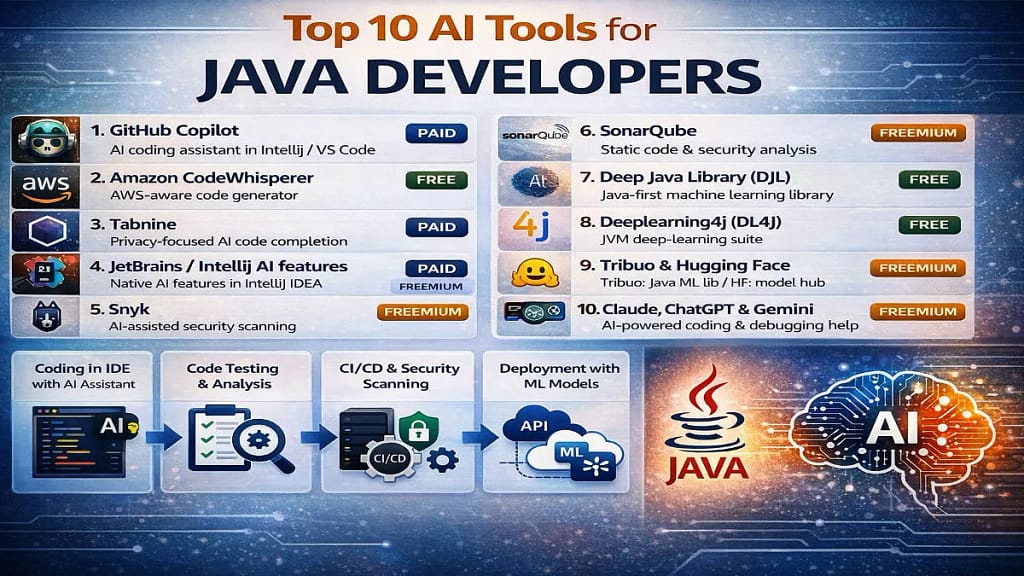
1. GitHub Copilot—Helpful, But Dangerous If You Blindly Trust It
The first time I enabled Copilot in IntelliJ, it felt magical.
I typed:
Boom.
The controller, service, and even repository structure appeared.
But here’s the truth.
Copilot is great when:
you already know what you’re building
you want to avoid typing repetitive code
you’re working on Spring Boot boilerplate
It’s not great when:
you don’t understand what the code does
you copy without reading
you’re learning Java basics
As a fresher, Copilot helped me move faster, but only after I forced myself to read every line it generated.
2. Amazon CodeWhisperer—Useful If You Touch AWS (Most Freshers Don’t)
If your college project or internship uses AWS, this tool suddenly makes sense.
It helps with:
AWS SDK usage in Java
common patterns for S3, DynamoDB, Lambda
But if you’re just learning:
Core Java
OOP
Collections
JDBC or Spring basics
You won’t feel much difference.
I tried it.
Closed it.
Came back only when AWS entered my life.
That’s okay.
3. Tabnine—Feels Safer Than Copilot for Beginners
Tabnine felt less “pushy.”
Instead of dumping full methods, it:
completes small logical chunks
respects your coding style
doesn’t overwhelm you
As a student, that felt comforting.
It’s good when:
you want suggestions, not full solutions
you’re practicing Java syntax
you’re writing logic step-by-step
If Copilot feels like too much, Tabnine is calmer.
4. ChatGPT—The Tool I Actually Used Every Day
Not for writing code.
For understanding code.
That’s the difference.
I used ChatGPT to:
explain
HashMap vs ConcurrentHashMapbreak down Spring annotations
debug logic errors
convert theory into simple examples
Instead of asking:
“Write Java code for XYZ”
I asked:
“Explain this error like I’m a second-year student.”
That’s where it shines.
Used correctly, ChatGPT feels like a patient senior, not a cheating tool.
5. IntelliJ AI—Helpful If You Already Use IntelliJ Properly
If you live inside IntelliJ, this feels natural.
It:
explains methods inside your project
helps refactor code
generates test cases
But it won’t save you if:
your project structure is messy
you don’t understand packages
you don’t know basic debugging
Think of it as a polishing tool, not a learning shortcut.
6. Snyk – Security Matters More Than Freshers Think
During one internship task, my senior said,
“Your code works, but it’s risky.”
That’s when I understood tools like Snyk.
It:
scans dependencies
finds security issues
warns about vulnerable libraries
As a fresher, you may not fully understand security yet.
But seeing warnings early builds good habits.
You don’t need to master it.
Just be aware it exists.
7. SonarQube—The Silent Judge in Many Companies
You might not use SonarQube in college.
But companies do.
It checks:
code quality
bugs
code smells
The first time my code failed Sonar checks, it hurt.
But it also taught me:
cleaner naming
smaller methods
better structure
It’s strict.
And that’s why it’s useful.
8. Deep Java Library (DJL)—When Java Meets Real AI
Most students think:
“AI = Python”
That’s not fully true.
DJL lets you:
use AI models in Java
add prediction or image processing
stay inside the Java ecosystem
I won’t recommend this for beginners.
But if you’re:
doing a final-year project
curious about AI and Java
tired of switching languages
DJL is worth exploring slowly.
9. Deeplearning4j—Heavy, Powerful, Not for Everyone
This one feels… serious.
DL4J is used in:
enterprise systems
big data setups
performance-heavy environments
As a fresher:
you don’t need to master it
you don’t need it for placements
But knowing it exists expands your thinking beyond “Java is boring.”
10. Tribuo & Hugging Face APIs – Practical ML Without Too Much Noise
Tribuo is simple ML in Java.
Hugging Face gives ready-made models.
Together, they help when:
your project needs classification
you want predictions without deep ML theory
you want results, not research papers
Again—optional.
Interesting.
Not mandatory.
What I Wish Someone Told Me Earlier
AI tools won’t fix:
weak Java fundamentals
poor problem-solving
skipping practice
They will:
reduce frustration
speed up learning
explain things differently than textbooks
Use AI tools after you try on your own.
That one habit changes everything.
A Simple Way Freshers Can Use AI Without Ruining Learning
This worked for me:
Write code yourself
Run it
Break it
Ask AI why it broke
Compare your solution with AI’s
Not the other way around.
Final Thoughts
AI tools are not shortcuts to a job.
They’re mirrors.
If your basics are weak, they expose it.
If your basics are strong, they multiply it.
For Indian students and freshers, the goal isn’t to use every AI tool.
The goal is to learn Java better, with less frustration.
If one tool helps you understand faster, keep it.
If it makes you lazy, drop it.
Disclaimer
This article is based on personal experience and observations as a student. Hiring processes may vary across companies.
If you’re learning Java, then follow this roadmap: Java Roadmap
Read More in Java Documentation
Why freshers fail tech interview
Discover more from GroWithMoney
Subscribe to get the latest posts sent to your email.