If you’ve ever tried to buy Minecraft for PC and paused for a full minute thinking, “Wait… why are there so many versions?” you’re not alone.
The Minecraft Java vs Bedrock vs Windows debate confuses beginners and even long-time players. Microsoft’s naming choices haven’t exactly helped either. Add different features, platforms, and performance differences, and things get messy fast.
This guide clears it all up cleanly, honestly, and without marketing fluff.
By the end, you’ll know:
Whether Bedrock and Windows Edition are the same
Which version you should actually buy
What works best for PC gamers, mod lovers, and multiplayer fans
Let’s untangle it.
If you want a deeper breakdown, this detailed Minecraft Java vs Bedrock guide explains core gameplay differences in simple terms.
What Are the Main Minecraft Editions?

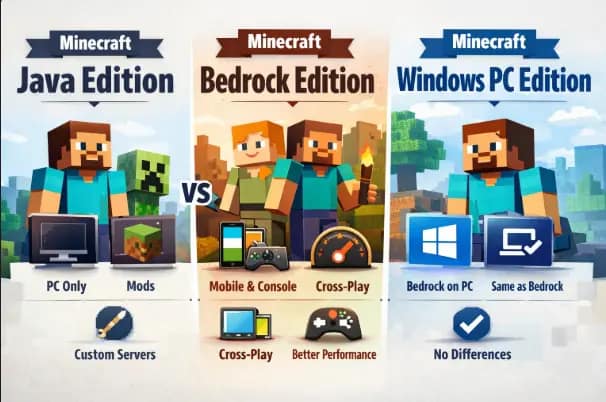
Before comparisons, we need clear definitions. Minecraft currently has two active core editions for players:
Minecraft Java Edition
Minecraft Bedrock Edition
“Windows Edition” is not a separate third version anymore, and that’s where most confusion starts.
Minecraft Java Edition Explained
Minecraft Java Edition is the original version of the game. Mojang released it first, and it still runs on the Java programming language.
Key facts about Java Edition:
Available only on Windows, macOS, and Linux
Uses Java-based code
Strong modding and customization support
Large community servers and custom content
Java Edition feels like the “classic Minecraft experience.” Many long-time players still prefer it for its flexibility and depth.
Java also updates at the same time as Bedrock, so gameplay features remain aligned.
Official source:
https://www.minecraft.net/en-us/store/minecraft-java-bedrock-edition-pc
Minecraft Bedrock Edition Explained
Minecraft Bedrock Edition is the cross-platform version built on the Bedrock engine (written in C++).
Bedrock Edition runs on:
Windows PC
Android & iOS
Xbox
PlayStation
Nintendo Switch
This version focuses on performance, stability, and cross-play. You can play with friends on consoles or mobile, which Java can’t do.
Bedrock is also the base version used for future platform expansions.
Official documentation:
https://learn.microsoft.com/en-us/minecraft/creator/
Are Bedrock & Windows 10 Editions the Same?
Short answer: Yes, today they are the same.
Long answer: Windows 10 Edition was the old name for Minecraft Bedrock on Windows PCs.
Microsoft officially retired the “Windows 10 Edition” branding and now simply calls it Minecraft Bedrock Edition.
What this means:
If someone says “Minecraft Windows Edition,” they usually mean Bedrock
You are not missing features by choosing Bedrock on Windows
There is no third hidden edition anymore
This naming change caused years of confusion, but technically
Windows 10 Edition = Bedrock Edition (on PC)
Minecraft Java vs Bedrock vs Windows: Key Differences
Let’s break this down clearly and honestly.
Platform Support
Java Edition
Windows
macOS
Linux
Bedrock Edition
Windows
Android
iOS
Xbox
PlayStation
Nintendo Switch
If cross-platform play matters, Bedrock wins instantly.
Performance & System Requirements
Bedrock is more optimized and runs smoother on low-end and mid-range PCs.
Java uses more system resources and depends heavily on CPU performance.
Bedrock → better FPS on weaker systems
Java → needs tuning or performance mods
This isn’t a flaw, just a design difference.
Bedrock generally performs better on low-end systems, as explained in this performance comparison guide.
Mods, Custom Content & Flexibility
This is where Java shines.
Java Edition
Free mods
Community tools
Custom servers
Deep customization
Bedrock Edition
Marketplace-based content
Limited mod access
Add-ons instead of true mods
If you love tweaking gameplay, Java is unmatched.
Multiplayer & Servers
Java and Bedrock cannot play together without unofficial tools.
Java multiplayer
Community-driven servers
Custom rules and plugins
No official marketplace limits
Bedrock multiplayer
Easy Realms setup
Cross-platform support
Controlled ecosystem
Both work well, just for different audiences.
Redstone & Game Mechanics
This is a niche but important difference.
Java’s Redstone behavior is more consistent and predictable. Many advanced farms and technical builds rely on Java mechanics.
Bedrock Redstone works fine for casual play but behaves differently in edge cases.
Mojang acknowledges this difference openly.
Reference:
https://minecraft.fandom.com/wiki/Redstone_circuits
Buying Confusion Cleared (What Should You Actually Buy?)
Good news: Microsoft simplified this.
When you buy Minecraft on PC today, you usually get both Java and Bedrock editions together in one bundle.
What you receive:
Minecraft Java Edition
Minecraft Bedrock Edition
One purchase, one Microsoft account
This removes the risk of “buying the wrong version.”
Official store:
https://www.minecraft.net/store
If you already own one edition, Microsoft often grants access to the other.
Best Pick for PC Gamers
There is no “best” version for everyone, only the right fit.
Choose Java Edition if:
You love mods and custom servers
You enjoy technical builds
You play mostly on PC
You want full creative freedom
Choose Bedrock Edition if:
Your PC is low-end
You play with console or mobile friends
You want smoother performance
You prefer simple setup
Smart PC Player Strategy:
Install both and use:
Java for single-player, mods, and creativity
Bedrock for multiplayer with friends
That’s the real power move.
If you’re still undecided, this breakdown on which Minecraft version is better may help you choose based on your play style.
Why Microsoft Keeps Two Editions
This isn’t about confusion; it’s about different player needs.
Java serves creators, modders, and technical players.
Bedrock serves cross-platform players and future devices.
Both editions are actively developed and officially supported.
Mojang statement:
https://www.minecraft.net/en-us/article/java-or-bedrock-edition
Who Should Choose Java, Bedrock, or Windows Edition?
Choosing the right Minecraft edition depends on your play style, devices, and goals. Each edition has strengths that fit particular types of players.
1. Choose Java Edition if:
You play only on a computer (PC, Mac, or Linux): Java is built for desktop systems.
You love deep customization and mods: Java supports vast community mods that can change gameplay completely.
You want to join large community servers with custom rules, minigames, and plugins.
You enjoy experimenting with snapshots (early previews of new features).
Java is the choice for modders, creators, and technical players who want maximum freedom.
2. Choose Bedrock Edition (including Windows 10/11) if:
You want cross-platform multiplayer play with friends on Xbox, PlayStation, Switch, and mobile.
You prefer smoother performance on low-end devices.
You like official Marketplace content (skins, texture packs, worlds).
You plan to play on non-PC devices (mobile or consoles).
Bedrock is ideal for players who want easy setup, wide device support, and crossplay with friends.
3. Windows Edition (Bedrock on PC)
The “Windows Edition” name is basically Bedrock Edition on Windows PCs. It works the same as Bedrock on other platforms and gets cross-play and optimization perks.
Common Myths (Quick Cleanup)
“Java is dying.”
False. Java still receives full updates.
“Bedrock is pay-to-win.”
False. Marketplace content is optional.
“Windows Edition is separate.”
Outdated. It’s just Bedrock now.
Quick Comparison
| Feature | Java Edition | Bedrock Edition | Windows (Bedrock) |
|---|---|---|---|
| Platforms | PC only | PC, Mobile, Console | PC |
| Mods | Full mod support | Limited add-ons | Same as Bedrock |
| Performance | Moderate | Optimized | Optimized |
| Cross-play | No | Yes | Yes |
| Best For | Modders | Casual & friends | PC cross-play |
FAQ
1- Can Java and Bedrock players play together?
No. Java and Bedrock multiplayer are separate ecosystems. Players must be on the same edition to join a game.
2- Is Bedrock better for performance?
Generally, yes — Bedrock is optimized for a wider range of devices and often runs smoother on lower-end systems.
3- Do you get both Java and Bedrock when you buy Minecraft?
On modern PC sales, Microsoft often bundles Java and Bedrock in one purchase through the official Minecraft store. That makes it easier to try both versions without buying two separate games.
Final Verdict: Minecraft Java vs Bedrock vs Windows
The Minecraft Java vs Bedrock vs Windows confusion exists because of naming, not gameplay.
Once you understand:
Java = flexibility and mods
Bedrock = performance and cross-play
Windows Edition = old Bedrock name
The choice becomes easy.
If you’re on PC today, the safest and smartest option is the official Java + Bedrock bundle. You get flexibility, performance, and zero regret.
Minecraft isn’t about editions anyway; it’s about what you build with them.
And now, you can choose confidently.